
Killer Apps for A Successful Twitter Network (Pt.1)
If you’re a Twitter user, then I’m sure you’re familiar with the hot debate over the Twitterville lately, about how Twitter could be the no.1 Search Engine in near future. Although the assumption of Twitter out beating Google Search has received mixed opinions from the public, but up till now, nobody can underestimate the power of Twitter as the next-best-thing in social networking (probably SEO too)! Even Google has a Twitter account now with more than 13,000 followers just as we speak! So, why not?
Key Element To A Successful Network ~ Mingle with The RIGHT people
Imagine you’re at a gathering, in a room full of people you barely knew, how would you determine who you should talk to for starter? Somebody HAS to start the conversation right? But what to say? When to jump in the conversation? I wonder who loves music as much as I do ? I want to promote my business, who could be my potential customers? …
“I know NO ONE! How should I start?”
If that’s the case, you’ve came to the right place! (don’t panic. Cocktail, anyone?)

Let Me Guess… The Twitter Search Applications??
BINGO! You’re smart! From my first impression about Twitter until today, my interest for this little gadget has grown significantly. As the hot topic enrolled in early March, when Loren Baker talked about the 9 Twitter Search Apps that are ‘Better Than Twitter & Google’, I immediately compared it with the 10 Best Places To Get Twitter Followers by Ronation in General Business. I’m not surprised for the similarities of the Apps introduced, they are indeed, very user-friendly. However, here we will be focusing more on the ‘Search’ tools as the discussion goes on.
So MANY of them!…Just How Should I Know WHICH one to use?
That’s the GOOD news I’m about to share with you. After throwing massive time and energy in testing out these tools, including the ones suggested by the readers, I have this mind-mapping drafted: (Click the icon to be brought to the Search Engine Site that suits your need.)
Reminder:
The Clickable Chart only works within its own post:
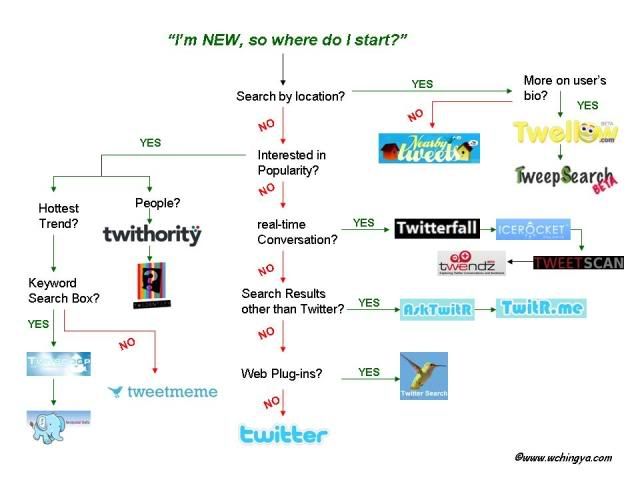
~Click Here for Enlarged Image. Clicking ability only works within its own post~
Thanks for the list which covers most applications I appreciate. I strongly suggest you also check out http://MicroPlaza.com and its Tribal Search which has just been released under private beta and which provides a mix of Digg, Delicious and RSS that allows you to browse, search and monitor relevant news tweeted by the people or groups of people you follow… and lot’s more.
An example is this search for most popular articles from the BBC website: http://microplaza.com/search?q=url%3Anews.bbc.co.uk
Cheers
@Olivero
Another informative post. i don’t use Twitter as much as I should.
Wow, looking forward to learning more. I’ve found some of these search apps to be quite helpful. 🙂 Keep rockin it!
-Mig
Hi Olivier, thanks for your comment, and your explanation about microplaza. I haven’t get into depth with this application just yet, but I’ll definitely give it a run through. If it could benefit the users, perhaps I’ll give it a thought too. Thanks for the notice.
Hi Rose, thanks for your comment. Just trying my best to put up the informative stuff, while learning it at the same time. ^^ Too much to learn really, my brain is too small to keep it all, luckily someone created ‘BLOG’. ha..
Hi Mig, I’m glad you think so. It took me days to create that chart. Hopefully it’ll help others to save time too, while look for potential groups to mingle with. ^^ Glad it helps.
This is a great start Ching Ya. The mind map is very informative. Looking forward to this series to get more twitter wisdom 🙂
Dear Rajeev a.k.a Mintblogger, thank you so so much for your kind words. Your encouragement boost up my confidence, really need it. ^^ Thank you for your support. And always looking forward to your feedbacks on the process. Thanks again.
Thanks for sharing. And I am new at twitter and still have so much to learn about it.
Hi Salute ^^
No problem, I feel the same way too. Take your time, and get adapted with the gadget. Most of all, enjoy it. See you in Twitter.
Good resources about Twitter and I’m looking to learn how to use twitter from your useful twitter map. Keep up the good work and way to go!!!
Thanks Ching Ya – I’m still fairly new to Twitter and this was a very informative post. Still trying to work out hash tags?? Is there a list of them all somewhere or something?
Well done, as always. 🙂
Hi, iValueNews, welcome to my humble home. ^^ I appreciate it alot, glad you found them useful. Stay tuned for pt.2 as more insights about the Apps soon. Take care.
Dear Rosey, so happy to see you here! Must be busy planning for this coming weekend? ^^
Back to the hashtags topic. To my understanding, there's no 'COMPLETE' listing of all the #topics available since it's updated almost every seconds. People using it as a 'grouping' purposes, anyone could put a hashtag on any words he/she likes. What I think you could do, is to try search whether there are people already using particular #topic that you intend to start with, at http://hashtags.org/ (most common site) or even try the search tools provided above, say the search.twitter.com (official & having refresh ability for results).
If anyone has a better answer, do jump right in. ^^
I signed up with Twitter quite a while ago and only in the last few months have I started to actually spend time using it. I’m getting used to it slowly and now have to buckle down and start using it effectively for my blogs. Great post and I will be looking forward to your next one. 🙂
Hi Ching Ya Please take sometime out to read this christian ladies site …http://channelofhealing.com/?page_id=601 From Poddy.
Thanks Lilymom. You're always one of my best supporters around. ^^ Couldn't thank you enough for your visits & comments. The feeling is mutual, looking forward to your great post too.
Hi, Alan. Nice to have you back. Thanks for sharing the link, I'll have a look. ^^ Take care.
This is a enthusiastic start Ching Ya. The knowledge map is very informatory. Superficial headlong to this periodical to get much cheep book
Thanks alot, Manish. Actually I was intended to squeeze in more apps in this map however the space is clearly overloaded. ha..
Welcome & hope to see you around.