
[UPDATED 2023] 15 Practical Ways to Protect Your Facebook Profile from Facebook Page
Previously, we’ve talked about how to separate your personal profile from Facebook Page. Since you need to create a Facebook account to manage a Facebook Business Manager account (Business account) anyway, which is why, brings me to our next discussion.
We will talk about how you can prepare your personal account to fit in the ever-growing Facebook world – by being real and less public at the same time.
More Ideas to Keep Your Personal Profile Separated from Facebook Page
There are things you can do to minimize your connection to the business world/Facebook page.
The highest level of security is to limit profile visibility on Facebook. You won’t be able to stop someone from finding you on Facebook completely, but by going through these settings, you’re telling Facebook you wish to keep things private and only share them with people you care about.
#1 Limit Who Can Find You on Facebook
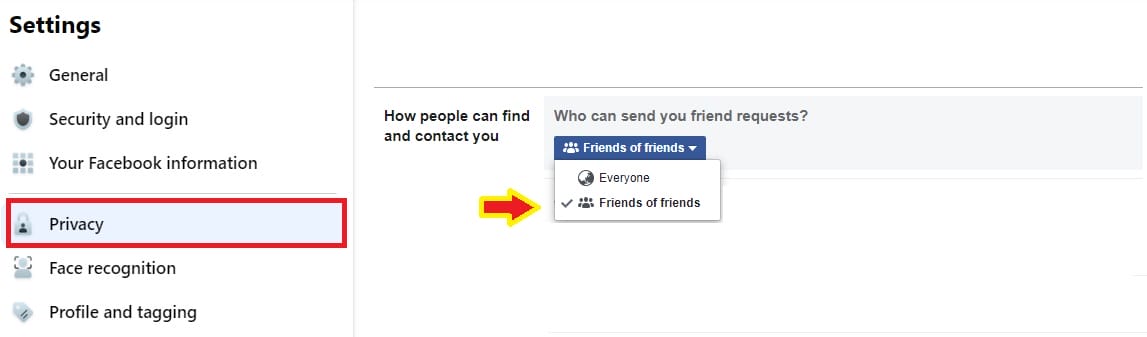
To do so, limit friend-finding to just ‘Friends of friends’. Meaning, only friends of your Facebook friends can send you friend requests.
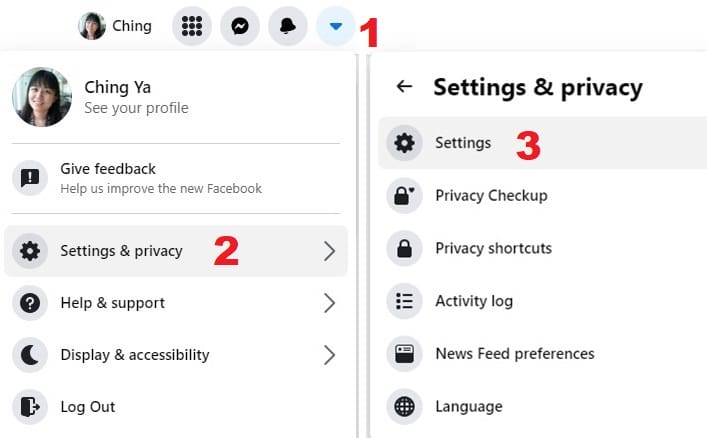
Go to Facebook Profile’s Settings & Privacy > Settings > Privacy > How people can find and contact you > Who can send you friend requests > Friends of friends
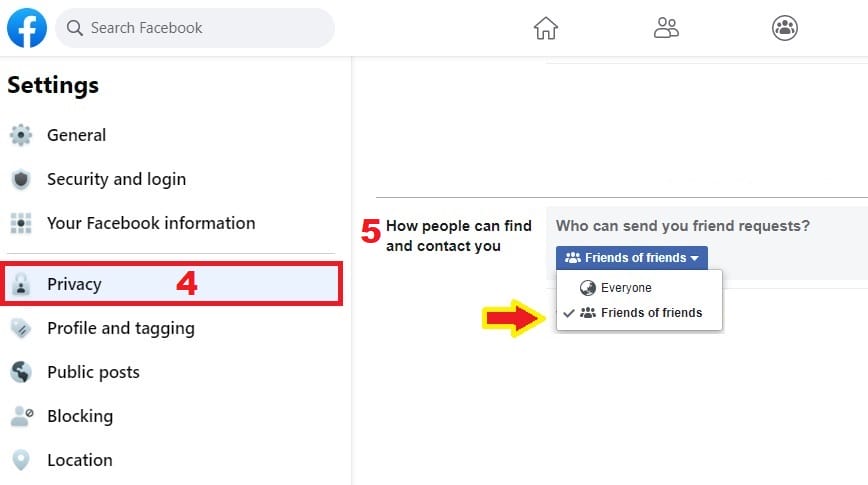
This privacy setting will narrow down the quantity of people reaching out to you surely, unless you happen to befriend someone on Facebook with thousands of friends… well, that’s another story.
In that case, you can choose to ‘follow’ the person instead, without friending, but that will limit your connection with the person to just viewing his/her public posts.
#2 Select a Unique Username or None At All
If you’re new to Facebook, your account need to be verified via mobile phone before you can set/change your username.
Go to Settings & Privacy > Settings > General > Username

Your business contacts may still try to find you on Facebook via username, phone number and email address. So, if you put your name as your profile’s vanity URL: ‘http://facebook.com/yourname’ may just give you away. Do not set one for the profile, or modify it if necessary.
#3 Protect Profile Information from Public Viewing
There are several information you can hide from strangers, especially your phone number and email address, which people can use to find you on Facebook. Adjust all the necessary privacy settings:
Go to Settings & Privacy > Settings > Privacy > Privacy Shortcuts > Manage Your Profile
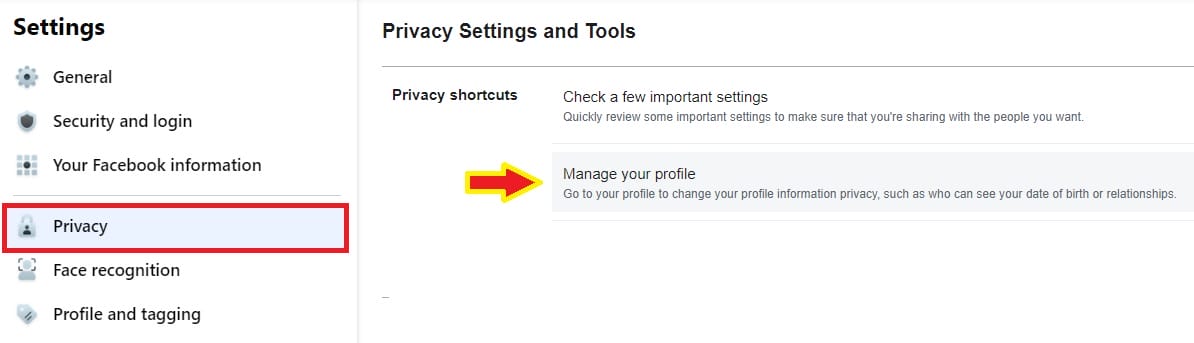
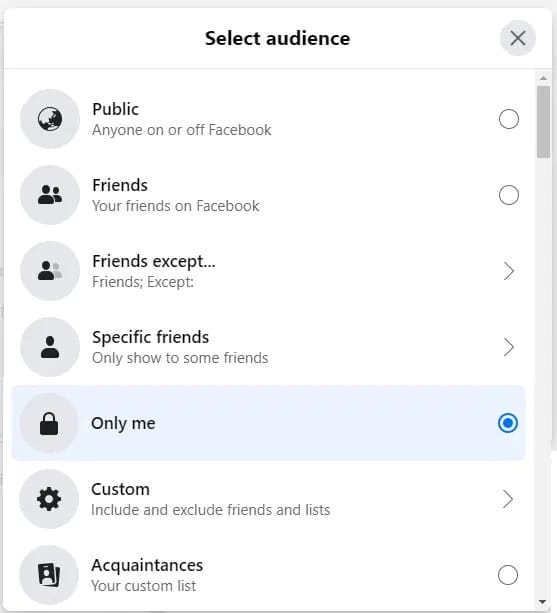
This will limit visibility of your birth date, relationship status, mobile phone number, places lived, work & education and more. You may ‘Select Audience’ to fit your requirements. I’ll set it to ‘Only Me‘ for now.

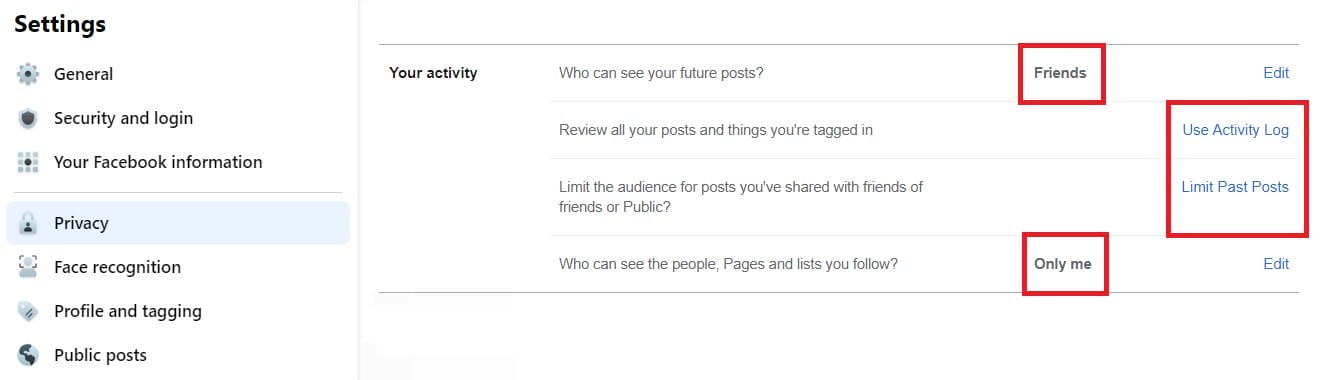
Other privacy settings including limit visibility of all your future posts and activities across Facebook, turn off search engine crawling of your Facebook Profile etc. Read more about these settings at this post.
i. Hide your Friend List
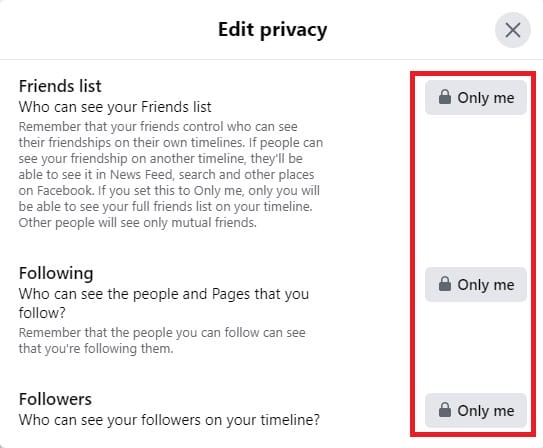
If you are to protect private contacts such as close friends or family members, customize your Friend List to ‘Only Me’ or ‘Friends’. Be alerted that your business contacts may still reach out your real life friends so it’s advisable to tighten the option as suggested.
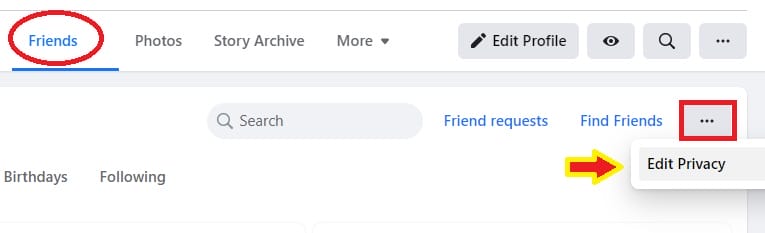
By set it to ‘Only Me’, other people will be able to see mutual friends instead of the full list, which can only be seen by you.
Go to Friends > Edit Privacy > set visibility to ‘Only Me’ for Friend list, Following and Followers.
ii. Hide Your Work and Education, Places lived
Unless you are using your Facebook profile as part of your effort to engage/networking with other business contacts or Pages, otherwise protect the mentioned info or leave them blank. Click your profile, go to About > Overview > set visibility of your workplace to ‘Only Me’. Same method for all other options.
iii. Hide Your Interests, Likes, Groups and more
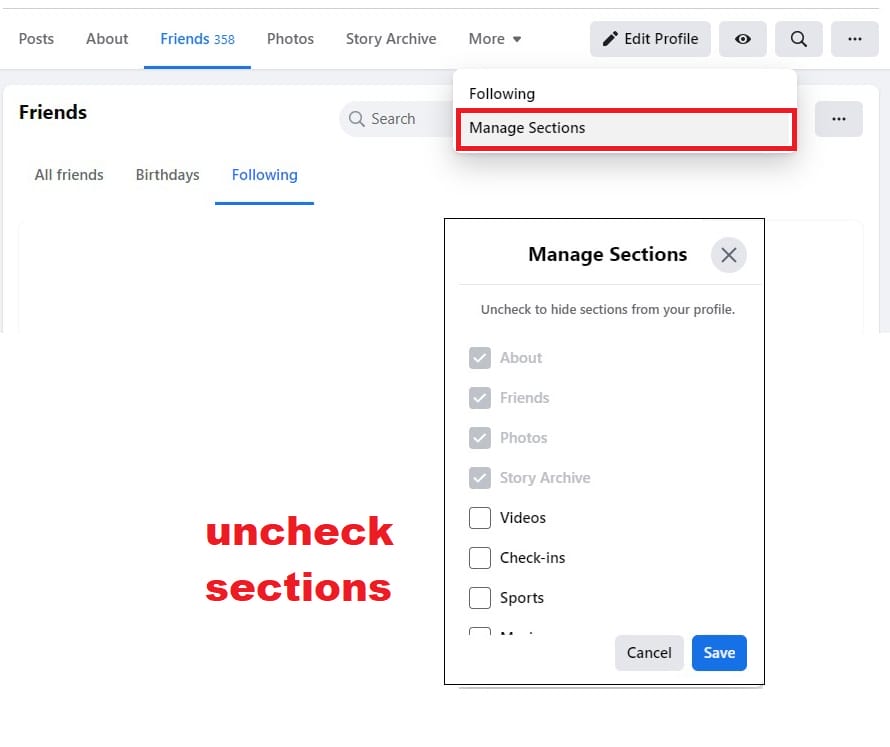
Now Facebook allows you to manage sections of your Profile as of what to remain visible while some, not. For example, you can hide check-ins, likes (liked pages), events, reviews given, groups and more.
Once you’re satisfied with all the settings, go back to your profile, click at the eye icon to ‘View as’. This will show you what public is seeing when they land on your Facebook Profile.
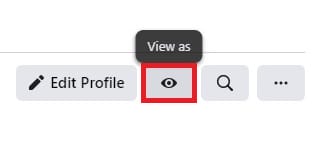
Another method to do this is to go to your Settings & Privacy> Settings > Profile and tagging > Reviewing > Review what other people see on your profile > View As
#4 Limit Contact Ability to Your Profile
Below options require you to be selective with whom you are friending on Facebook.
i. Friend Requests
The highest level of security is ‘Friends of Friends’. It is an option set so to encourage friends to find one another. Strangers will not see the ‘Friend Request’ button until they become friends of your Facebook friends first.
Set the privacy settings to ‘Only Me‘ if you don’t wish to be found when people try to look you up by using the email address and phone number you provided on Facebook. Also, select ‘No‘ if you don’t want search engines outside of Facebook to link to your Profile.

ii. Receiving Messages
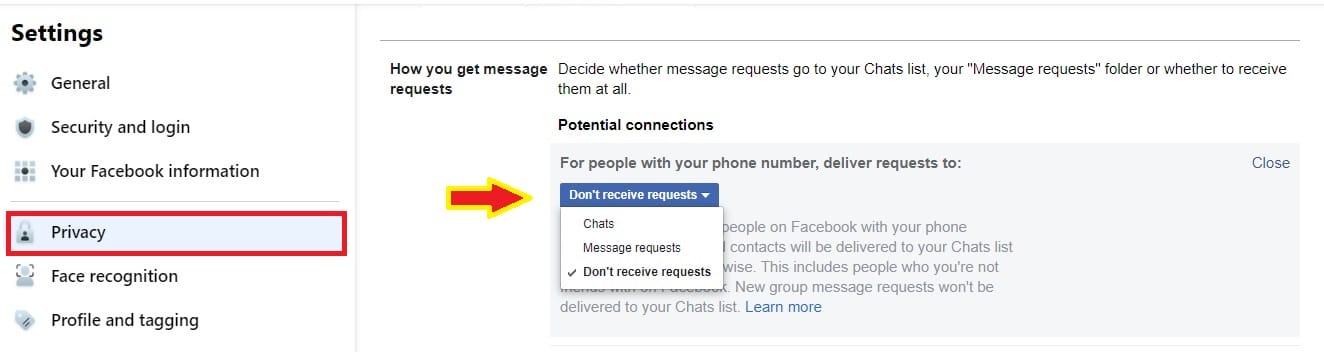
Nowadays, people can send you message requests, even you have not chatted or connected with them before. You can adjust settings to allow those messages to end up in Chats, Message Requests or Not to Be Delivered to you at all.
Facebook allows you to separate the potential contacts from complete strangers, so you may decide where their message requests land:
Go to Settings & Privacy > Settings > Privacy > How you get message requests > set to ‘Don’t receive requests’. But if you are interested for potential connections, you may set it to ‘Chats’ or ‘Message Requests’ instead.
#5 Limit the Ability to be Tagged or Shared by Friends
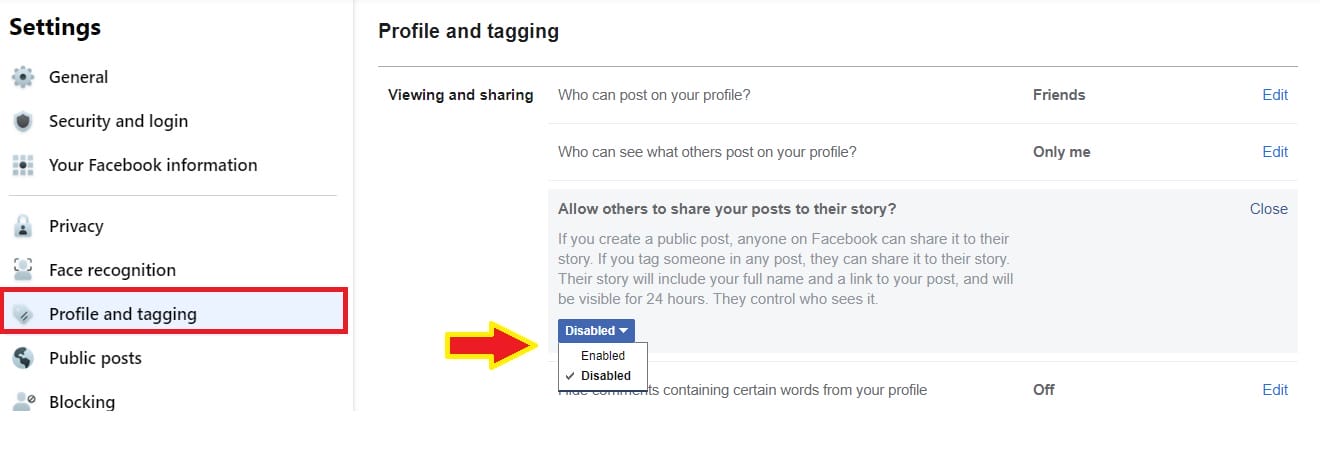
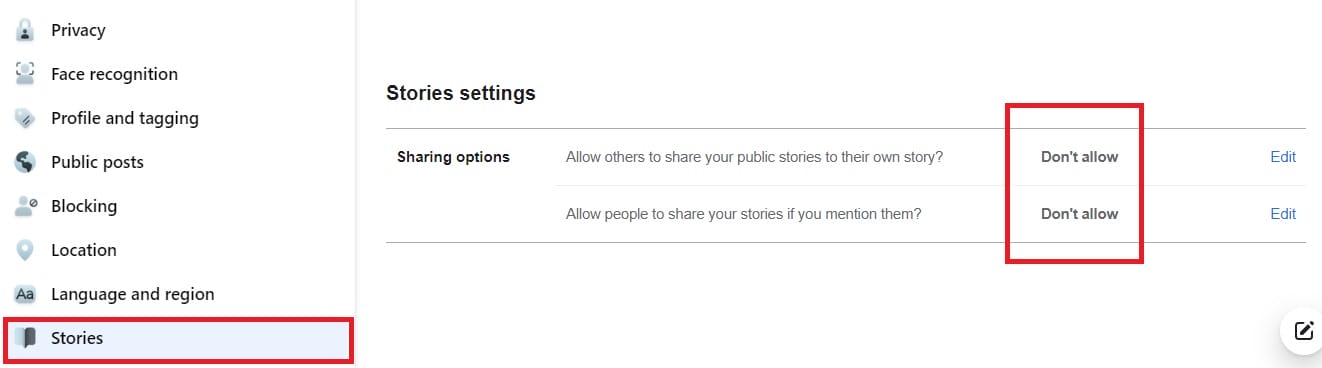
Facebook Stories: If you would like to prevent your friends from sharing your posts to their story, make sure you disable the option at once:
a) Profile and tagging > Viewing and sharing > Allow others to share your posts to their story> Disabled
b) Go to Stories > Sharing options > Allow others to share your public stories to their own story > Don’t allow
Tagging: You cannot control what your friends are sharing to their audience, but you can certainly avoid been tagged by going through the below settings. This will prevent your profile link been exposed to public while making sure no outrageous videos or pictures are attached to your profile:
Go to Profile and tagging > Tagging > customize the visibility to ‘Only Me’.
You can also review posts you’re tagged before they appear on your profile:
Go to Profile and tagging > Reviewing (set to ‘On’)
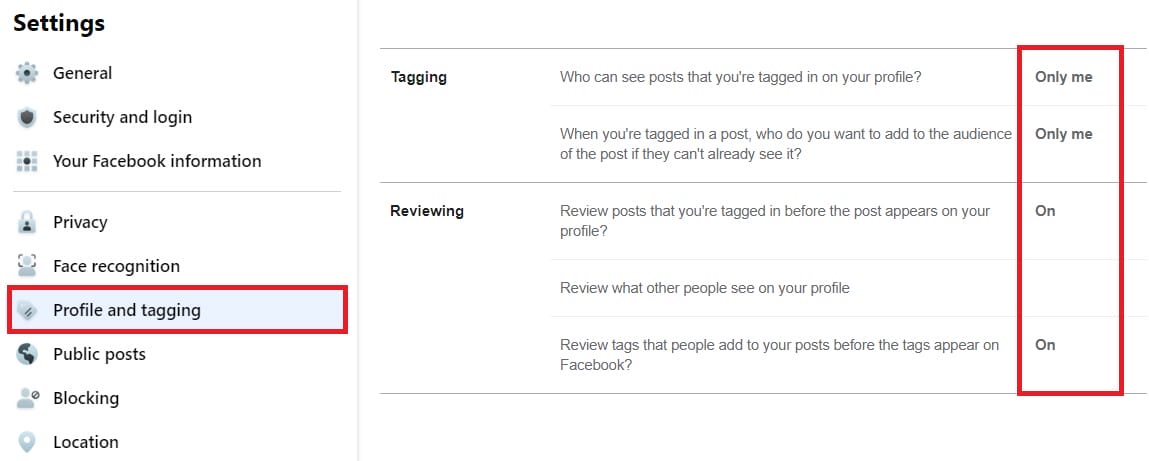
Your friend my still able to use status-tagging on you, at least you can remove the tag as soon as you found it on the wall.
#6 Check and Remove Unnecessary Facebook Apps
Make it a regular habit to check the apps and websites who have access to your Facebook account. Remove the unused/outdated ones to avoid intrusion or hacking. Be skeptical in all games and quizzes sending your way. Ignore or block the apps for good so they won’t appear on your posts. Go through each section as most of them are opt-in by default:
Go to Apps and websites > click View and Edit for selected app > Additional App Settings

You can stop getting notifications from the app or control who can see you’re using this app. Same thing goes for Instant Games. Just in case you have older posts by old or outdated Facebook mobile apps, tweak the setting as below:
Go to Apps and websites > old versions of Facebook for mobile > Only Me
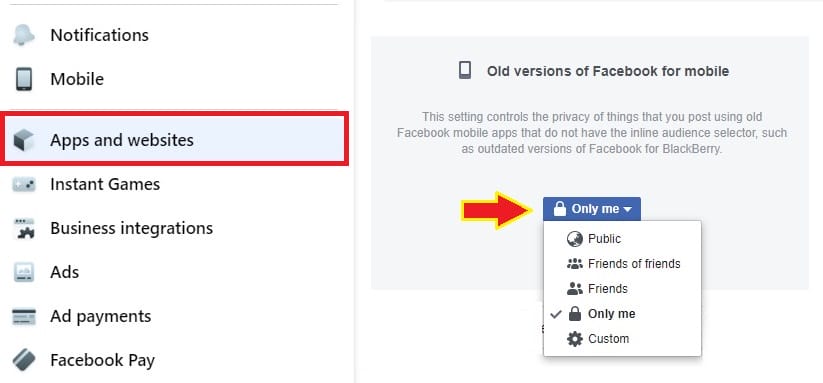
To hide the games you liked on Facebook, go to your personal profile > look for Apps and Games section > Edit Privacy > set the visibility for ‘Likes’ to ‘Only Me’. Another way, is to hide the section completely via ‘Hide Section’.
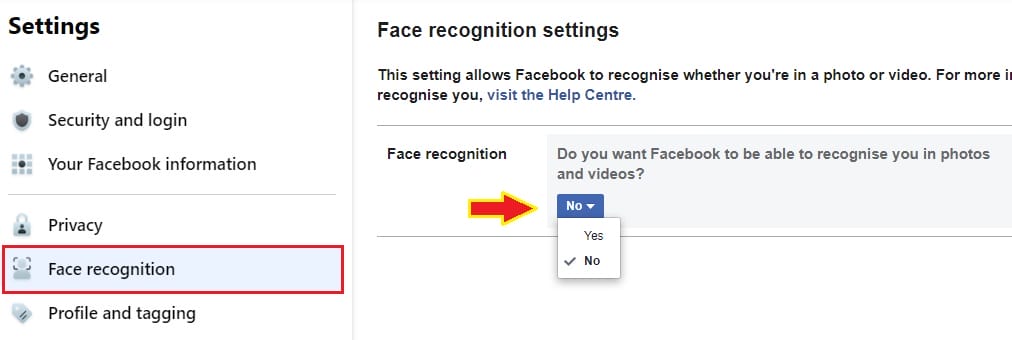
#7 Disallow Face Recognition
Change the setting to ‘No’ if you don’t want Facebook to recognize you in photos and videos. (Yes, they can do that!)
#8 Separate Business from Personal Contacts using Facebook Lists
This is a MUST if you have already mixed both business and personal contacts in your ‘Friends’ list. Not just for the sake of following up easily in News Feed, but to better control over what to be shared to specific group of people when updating your Wall. Best of all, you can declutter your news feed via these Facebook custom lists.
To setup a new list, go to your Facebook feed, expand the left column by clicking ‘See more’, then look for ‘Friend lists’, click at it.
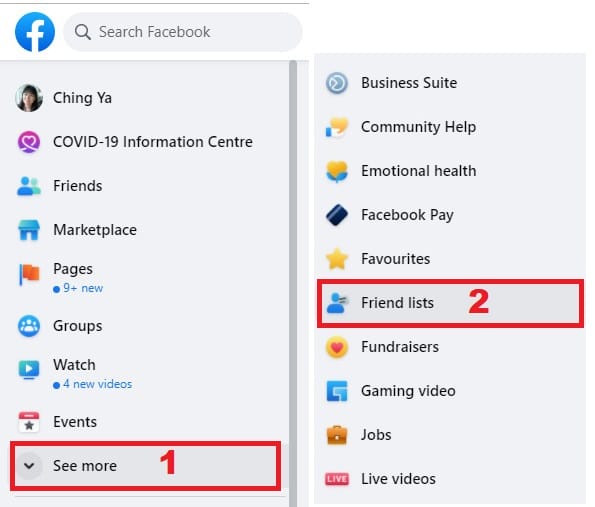
You will have a full list of custom lists, if you had created them beforehand. If not, start to create a new list by clicking ‘Create List’. Now you can give your new list a name and add members to it. Once you’re done, click ‘Create’.

To get more options for existing lists, click at the list you’ve just created in which you’ll be brought into a group-like feed. Here, you can manage your list further: Rename, Edit or Delete list.
#9 Control Posting Visibility via Share-ability
Facebook Lists enable you to hide sensitive information, friends and even real time Wall posts from appearing on some people’s news feeds.
Use the Privacy setting in the Publisher as shown below, select whom to block from the info or limiting the update to specific group of people only. For instance, if you about to post a personal update to selected group of friends, select from your custom lists prior sending out the update:

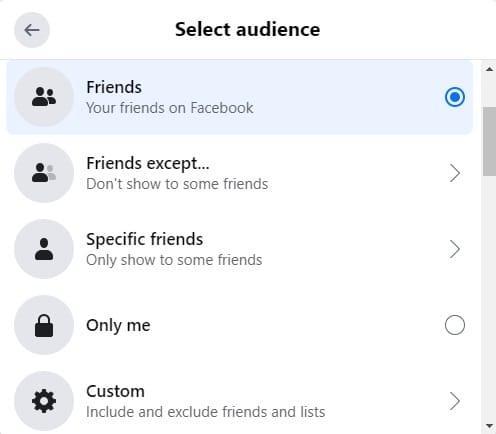
You can even custom your post privacy to hide it from your client list, if you had previously accepted their friend requests on Facebook:

#10 Tighten Up Privacy Option for ‘Friends of Friends’
The reason I’m emphasizing on ‘Friends of friends’ is because your business contacts may reach out to your friends for friendship. No way we can prevent that so if you have set ‘Friend of friends’ for certain profile information, try to restrict its visibility further via:
- Custom Privacy: If the person is in your ‘Friend‘ list.
- Block: If the person is not in your ‘Friend‘ list:
Go to Settings & Privacy > Settings > Blocking > Restricted list or Block users
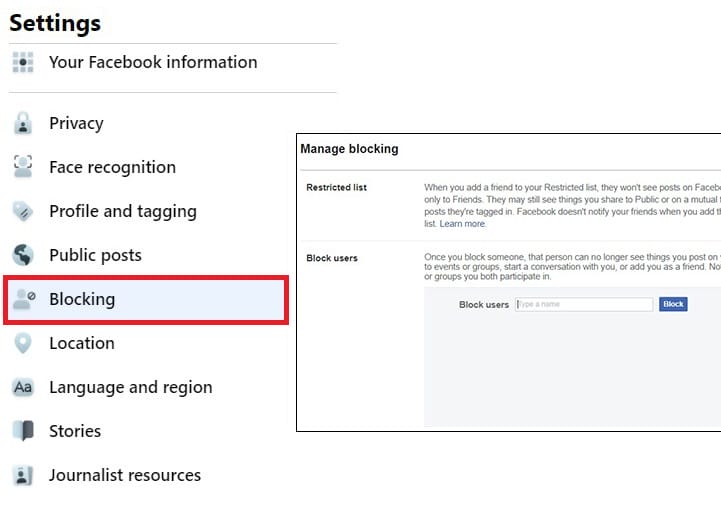
To restrict or block someone, you need to understand the difference:
- Restrict someone – he/she will be able to see your Public posts or tagged post of them.
- Block someone – he/she won’t be able to see your posts at all. By blocking someone, that person will be removed from your Facebook Friends at once.
Or if you can’t find the user via ‘Name’, just block from his/her profile instead:

#11 Set Future Post Visibility Once and For All
Another way to separate business contacts from personal is by hiding your future posts from them once and for all. Here’s a quick way to do it:
Go to Settings & Privacy > Settings > Privacy > Your activity > Who can see your future posts > set the audience visibility to ‘Custom’ in which you can adjust who to share/you don’t share with.
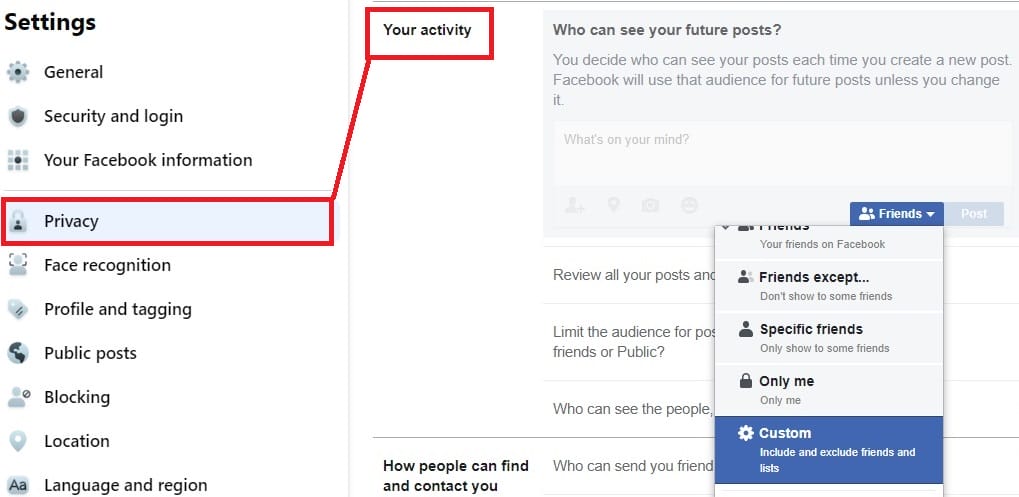
In the audience drop down menu, click ‘More’ and then ‘See All’ to load the custom list option.
Public Post Filters and Tools:If you’re particular about who can follow or comment on your Public posts, be sure to control the visibility: Go to Settings & Privacy > Settings > Public posts > Public Post Comments (either set to ‘Friends’ or ‘Friends of friends’)
#12 Always Comment as your Facebook Page
Whenever a page admin tries to comment or post on other Facebook Pages, all responses will be seen as coming from the admin’s personal profile by default. Unless, you switch to do so as your Facebook Page.
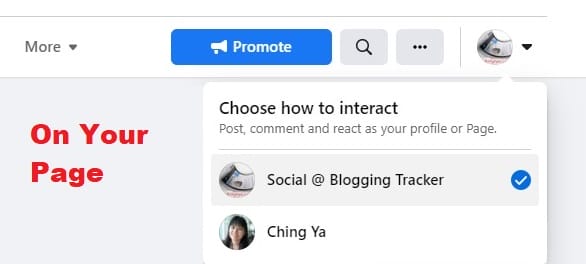
On your Facebook Page, it’s always recommended to comment as Your Page. As for other people or Pages that tagged your business page, feel free to acknowledge their kind gesture by thanking them as Your Page (not your personal profile). It’s a good way to boost visibility and build connections for your business, without giving out your personal info.
#13 Status-Tagging & Liking as Your Page
Tagging, when used properly, can help to promote or network with other Facebook Pages. Be sure to use this feature moderately when you’re trying to status-tag another page. You can also like a page as your Page, just choose ‘Like as Your Page’ from the drop down menu.
The advantage of ‘Like as Your Page’ is that it won’t be included in your Profile’s activity log or showing up on your Personal Profile. The other Page will also be notified about your Page liking it as well. No private info is shared except your business page.
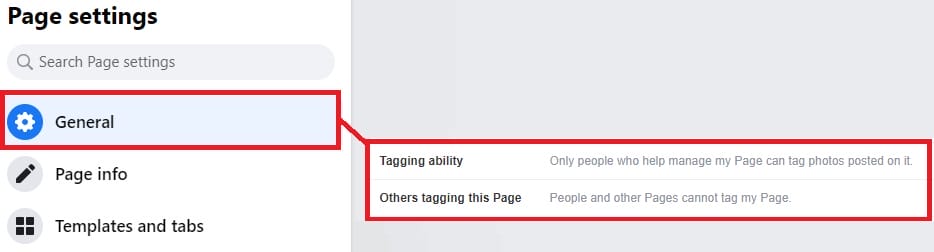
As for photos- and videos-tagging on Facebook Page, you can manage tagging ability of your page here: Go to Manage Page section at the left column, go to Settings > (Page settings) look for ‘Tagging ability’ and ‘Others tagging this Page’.
#14 Ability to ‘Share’ as Your Page
‘Share’ is another key influential option for you to network with other Pages, along with status-tagging the page in your post description. It’s a good way to give credit for the original poster as well.
#15 Knowing that ‘Privacy Settings’ is not Invincible
Not to be a party pooper but it’s important to be self-prepared. Do not post what you don’t want others to find out. Moderate your messages, photos, videos and status updates… so that even if there may be security loopholes, you’ve got nothing to worry about.
What Do You Think?
The idea of this post is not to offer you the best method but suggestions that one may find helpful in managing his/her Facebook account. Facebook will continue to evolve. No matter how far we go, always remember we are responsible for our online presence and branding. If you do not bother about it, nobody else will.
Did I miss out anything? Share your ideas in the comments.
MORE FACEBOOK TIPS:
- How to Change Page Name, Username and Facebook Access (and MORE) in New Page Experience
- How To Comment As Your Facebook Business Page On Other Facebook Pages
- How To Add Official Facebook Page To Your Personal Profile
- How To Separate Your Facebook Page From Personal Profile
- How To Find Your Pending Friend Requests (And Sent Requests) On Facebook
- How To Connect A Facebook Group To Your Facebook Page
MORE TWITTER TIPS:
MORE INSTAGRAM TIPS:
- 15+ Lesser-Known Instagram Tips, Features And How-To’s You May Have Missed
- How To Organize And Control Instagram Feed For Accounts You Follow
- How To Schedule Post & Video To Instagram From PC
- How To Post To Instagram From PC
- How To Post Link On Instagram Story [With Link Sticker]
- How To Switch To Instagram Business Account From Your Personal Account
Hi Ching,
I’m glad you shared this post. I recently started a new fan page and was wondering how to keep things separate.
I also now know how to keep things private and separate. Thanks! 🙂
Great information and very helpful!
Take care!
-Evelyn
You’re most welcome, Evelyn. 🙂 Glad these info helps. I appreciate your visit and your encouragement means a lot. All the best in your facebook page endeavors! *hugs*
Great info on a very confusing subject, Ching Ya — Facebook Pages and Privacy. As an entrepreneur I have both personal and business friends and contacts on my Facebook business page and personal account. I decided awhile back that it was too labor intensive to divide my contacts into groups and assign them access based on the content of a particular status update. So I removed almost all of the privacy settings on both accounts and instead, temper what I say and how I engage.
It’s not the perfect solution, as I love the back and forth on subjects such as religion or politics, but I’ve found that it’s potentially volatile and definitely consuming, and not always in a productive way.
Learning as I go 🙂
Thank you Tim for dropping by. We are all learning everyday. 🙂 There is no definitely way on what’s best and what’s not, I’m glad you found a way that best fit yourself. Yes, sometimes it’s easier that way. As Facebook does not belong to us, we can only make use of the functionality as much as possible.
I have to agree, it is a confusing subject. 🙂 My hope is that few methods can be adapted by those in need and fine-tune their profile visibility if needed.
Appreciate your support always. Thanks again.
Hey Ching Ya, great article. I’m actually going to borrow some ideas in order to sell the benefits of a professionally oriented FB profile to clients. Many of them still opt to have a dummy one like “Name: John | Surname: From Acme Inc”.
All the best,
Facundo
Welcome Facundo, wish you a successful discussion with your clients about implementing some methods above. 🙂 And hope to see you here again soon.
Appreciate your comment.
Hi Ching Ya,
Whew! This is actually intimidating. Let me ask you something: What would be the harm if I just let everybody – business and personal – see all my “stuff”?
If I simply limited the overall status updates so as not to annoy my friends, I feel like I could just march on without having my head explode.
Cheers,
Mitch
Mitchell, good question there for everyone who runs a social media profile. 🙂
In my opinion, if one is cautious enough and not over-sharing his ‘sensitive’ details/opinions (even that is subjective), there’s actually nothing much to worry about. Just make sure by making everything ‘open’, none of the exposed conversations/photo with friends/closed ones will affect your professionalism and branding online. People are easy to jump into conclusions by a simple remark, or a picture before getting to know someone better. Which is way that we heard so much about people getting fired/sued over a bad remark about a customer/boss/company product.
Like awhile ago, Darren Rowse would like to have his fan page and profile separated for fans/family respectively. Either to keep things private, or just for the sake of easy monitoring between work and leisure. 🙂 And we all need to be ‘ourselves’ once in awhile.
Social media is unlike before. More opportunities, more risks too. It’s up to us to keep our profiles manageable (while we can). ^^
I agree with Mitchell, as long as your personal profile passes the ‘granny’ or ’employer’ test, just go ahead and let everyone in. I have set my photos to only show to about 10 people, everything else on my profile is open and it’s all clean!
Thanks, Ching Ya. Aaaargh! You make excellent points and I have to not be lazy and do this right 🙂
Cheers,
Mitch
Thanks Jorgen for dropping by. Yes, keep our profile ‘clean’, spot on. 🙂
Mitch, thanks so much for giving us all a chance to brainstorm when it comes to whether or not to keep things open. 🙂 I believe it’s an on-going question that we’ll be asking ourselves periodically.
Great article Ching Ya! Since I’m still in the workforce, I have to be extra careful that my personal profile always looks pretty innocuous, but I must admit I envy those guys who are totally living off of blogging and internet consulting and “what you see is what you get.” 😉 I’m looking forward to trying some of your tips so maybe I can enjoy the best of both worlds – open sharing with family and friends, yet very general and vanilla to colleagues and customers!
Christie,
I understand what you mean. Frankly speaking, I too, am wrestling with that question from time to time. It’s quite challenging but my hope is that I could have both worlds managed so to have leisure/work separated. It’s like you said, the conversations are very much different. 🙂
So great to have you here dear friend. Thanks again!
Thanks for the info Ching Ya. I just started a fan page and wanted to know how to separate personal from business. Great info as usual 🙂
Welcome, Kiran. My pleasure and feel free to drop me a message anytime if you have any requests or questions about it. I’m always open for suggestions and brainstorming. Keep up the great work in your blog, looking forward to visit your page too.
I guess separating both of them are great as I heard from my friend that she was fired just because of a Facebook photo.
Great, I was not knowing about this at all. I will just do it right now. Thanks Ching Ya!
Hi Ching Ya,
I’m very new to Facebook. I’m the administrative of the business page for my company. It is a page on my personal account. My employer wants to be able to block non-facebook users from seeing our wall. It was suggested to us to use a landing page. Will this stop non – users? I set our page to land on our Info page but during the test – my non-user just clicked on the wall tab and our wall page opened. Is there any way to block non-users from our wall.
Nan, Facebook page is meant to be public viewable. To avoid certain people from viewing your page, you can set age/country restictions – but not confirmed if non facebook users will be asked to sign up first in order to view it or not. By doing so, you will be blocking other facebook users that fits in the restricted category from seeing your page too.
Landing page won’t stop people from viewing your page, but works more like a ‘Welcome mat’ before they explore your page further.
Therefore, it’s not really logical to block non-facebook users from seeing your page, as they can sign up anytime. If you’d like to have more control over who can view your company page, Facebook Group is a more controlled, focused platform but of course, has its own limitations.
I had made this mistake of creating a business page from my personal account but was able to rectify it by changing the admins for the page.
Hi Ching Ya,
This post is awesome it is exactly what I was looking for.
I was just talking to my wife about how I have all these new contacts in facebook, but 200 of them are friends of mine and I didn’t want to mix business with pleasure.
Now I know how to separate the 2 thanks for sharing this!
Larry
You’re welcome, Larry. Glad this post can help to provide some insights in securing your profile from facebook pages if needed. Do visit again. 🙂
I am soooo confused about separating my personal page from my business page. I’m trying to set up a business page, but all comments people make as well as when I send a message seems to go to my personal page, any suggestions on what I’m doing wrong…it’s VERY important that I have a stand alone page dedicated to acquiring fans on my business page that does not inflict on my personal page. Do I just create a new account with a different login to do this? I’m so confused and need help NOW. Thanks!
Deniera, to answer your question:
“but all comments people make as well as when I send a message seems to go to my personal page”
— all comments made on your page will stay in your page, it will only go to your News Feed (if you liked your own page) as an notification but won’t appear on your Wall, so don’t worry about that. As for private message, it’s only dedicated to be used for personal profiles. Therefore, to contact your fans, you need to use ‘Send an Update to Fans’ which can be located from Edit Page -> right column, above ‘Admin’ panel.
“Do I just create a new account with a different login to do this?”
— if you already have a business page connecting to a personal profile, then no you don’t have to setup a new acc at all. FB has strict regulations for users having more than one account so try to avoid that at all costs. Just try to secure your profile as suggested in Pt.1 of the post (whenever suitable to your needs) then you should be all good.
If you have further questions, let me know. 🙂
Hi there, is there a way that when I post to another wall, I can choose whether it is posted under my personal profile or shows as being posted from the business page, ie I want to post photos on Africa Geographic’s page, showing as being from our business, rather than as from me personally?
Carolyn, unfortunately now there is no way we get to post as Page profile outside the business page. The only way to put your page on other page’s Wall is via status tagging:
https://wchingya.com/2010/06/status-tagging-successfully-facebook-pages.html
But do so moderately.
This is driving me CRAZY…if I want to post a comment, send a friend request or send a person a message from my business name, why does my personal name & pic keep coming up in the “from” box next to “comment”. I simply want to correspond with certain people through my business account….aaaarrrrrggghhhhh? I’m sooooo frustrated…what am I doing wrong?
Deniera,
You did not do anything wrong, it is designed this way that ‘commenting outside a page, sending a friend request or a message’ will always be from the admin’s profile instead of page. Therefore it is important to utilize your profile (while protecting it) for all interactions outside the page. FB is not a business network since start, so try to see page as an added value for your profile instead of the main feature may help to ease our frustration a little. 🙂 At least that’s all we can do as an ordinary user.
the biggest I have with this is that not being able to post or comment from my business page is “frankly” STUPID. If I’m trying to conduct business with someone, they’re not going to recognize my personal page, nor should they be expected to…it’s like mixing your personal funds with your business funds. YOU JUST DON’T DO IT… This sounds like a “glitch in the system” that needs to be addressed. When I’m conducting busines, I’m conducting busines. I simply cannot believe that there’s not a way to fix this, or is it me??? I see businesses post all the time with their business info…any ideas with that????
How do I remove the ban on a person that I blocked from a page?
Shermayne, you can only unblock a fan if he/she re-like your page (look him/her up in ‘People Who Like’ list and unblock).
Company pages are public and cen be seen by anyone whether they are Fans or not…Is there a way to Block/Ban someone that hasnt “liked” a company Facebook Page?
Justin, we won’t be able to block someone from our page if he/she has not liked the page. Unless you set age/country restriction but that will affect other users from the same criteria so not advisable.
How do I make seperate photo albums on my facebook business page from my iphone, please help!
Thanks
I am just as frustrated as Deniera in her comments! I have set up a page for our organization, it is connected to my personal, I have gone thru and set most of the privacy settings as you suggested but still have a few qzs?
1.Is it possible to set privacy settings so that everyone can find and post to the organization page wall but still have my personal wall restricted to friends only? If not, there should be separate settings!
2. What is the second page FB automatically setup when I set up the page? It has a yellow message box at top that says “Administer of pages” and says something about ‘administrater interface’? what is this page for and what do I do with it?
3. How do I get rid of the ‘Get Started’ tab that still shows up on the organizations page before the wall, info …tabs?
FB really needs to implement phone support!! HELP Please!!
Steph,
To answer your question:
1. Yes, just make sure all info & wall tab been set to ‘Me Only’ when it comes to customizing its visibility. The highest security a personal profile can get is an Info tab with no Friend Request & Messaging. Did you check out Part.1 of this article: https://wchingya.com/2010/08/protect-facebook-profile-business-page.html Make sure you have checked through your basic privacy settings as well.
2. I have yet encountered this, can you send me a screenshot? (advisable to post your screenshot to the Wall of the fan page: http://facebook.com/SocialBloggingTracker and I’ll try to have a look at it)
3. This is a tricky one. Some said ‘Get Started’ tab will only go away if you filled up everything. Personally I just ignored it, then after a few months the tab just disappeared by itself. Unsure why though but it happened. 🙂
Ching Ya,
I recently took over as admin for a fan page and was prompted to create a profile and did so.
Doing this affected my ability to do page administration on THE FAN PAGE.
I was listed as the administrator of the page and REMOVED myself in an effort to disconnect the profile from the FAN PAGE leaving NO ADMINS!!!!.
Today, The FAN PAGE is active but is still tied to the newly created profile with no way to do page administration.
I have tried contacting FB for support to no avail. Do you know of a fix to restore page administration and correct the profile issue?
Thx
Hi Mac, there’s very slim chance of getting the page back if you had removed yourself from the admin. If you had verify your account before with cell phone number maybe there’s a chance somehow. Kindly refer to this discussion and hopefully some of the users suggestions may help:
http://www.facebook.com/help/?question=860650
Can you please tell me if it is acceptable to be a business on a personal page. I was informed by a business that their Facebook page was shut down by Facebook because she needed to be on a business page. I am the manager of a boutique, but we have a regular page, NOT a business page. We are trying to determine if we need to switch, as we do not want to lose our contacts. Thank you.
Jennifer,
A fan page without connecting to a profile is referred to business account. A fan page = business page, so can you explain what do you mean by ‘regular page’ and ‘business page’ you are referring to here –> “I am the manager of a boutique, but we have a regular page, NOT a business page.”?
A personal profile can NEVER be used for business purposes. However, you can manage a fan page FROM a personal profile, meaning you can connect your profile to a fan page and administer the page from there.
Dear Ching Ya,
I’m new in facebook. Need your advice on the following:
I’ve created a personal profile earlier & later only I know I should create a page for business.
1. I can add friends to the personal profile but can’t add from business Page. How could I add friends so that it could divert the friends direct to my business page ?
2. I hope my company name will appear instead of my personal name when adding / inviting friends, how to do that ?
Yr immediate response wll be much appreciated. tq
You won’t be able to transfer friends from profile to a fan page. The only way is to suggest your friends to join you page as from this post – refer to #1, #2, #5 :
https://wchingya.com/2010/05/promote-facebook-fan-page-personal-account.html (#3 & 4 are no longer valid since fb removed boxes from profile).
Invitation via private message will always be seen as from the page admin but not the page profile. Suggest you to use some of the methods mentioned here to encourage people to like your page:
http://www.socialmediaexaminer.com/10-ways-to-grow-your-facebook-page-following/
Hope the info helps.