
How to Add Official Facebook Page to Your Personal Profile [UPDATED 2022]
Facebook is powerful and effective if been done right. But, there are times that I wish users can be given more control over things to share on their own accounts.
Ever since Facebook Page was introduced, users who are excited to share their professional backgrounds are constantly brainstorming to break through on a few matters, such as separating business from personal account, even though the idea of letting our contacts know about our expertise can be quite enticing as well. But, how can we achieve the sweet spot without appearing preachy or annoying?
One of the easiest and most friendly method is none other than adding a Workplace Link (formerly known as employer link) to your Profile’s About tab.
Table of Contents
How to Add Workplace Link to Your Personal Profile (Updated 2022)
Now for the latest Facebook Timeline layout, adding your Facebook Page as the Workplace (or employer link) is easier than ever. Just go your Facebook profile’s ‘About’ section.
If you had previously updated your work or other personal info, you can view them all at ‘Overview’. To add employer link to your personal profile, first you need to go to the ‘About’ section.
About > Work and education > Add a workplace
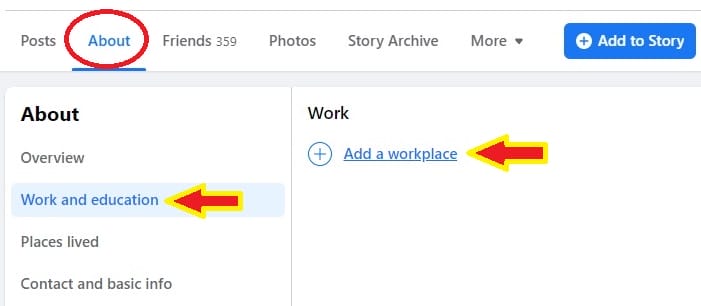
If your company had already created a Facebook Page, you can try to look for it. Or if you would like to add your own business page, you can do so as well.
Company: Just start typing your company name here and the drop down menu will show you a few suggestions. Once you’ve found your company, click to add it.
The page you added will have an active link so when people click at your company name, they will be directed to the Facebook Page. This will no doubt, increase the visibility of your Page.
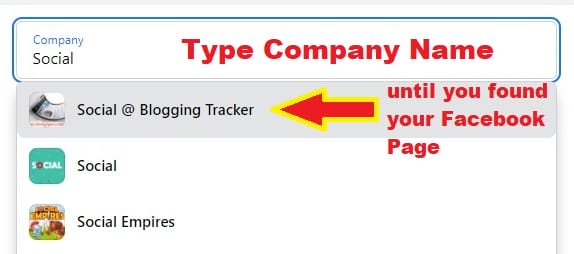
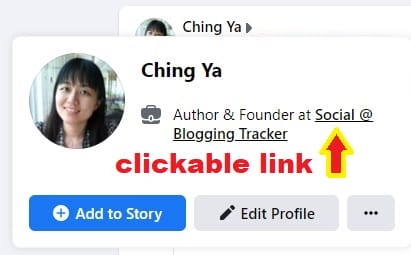
Sometimes, different branches may have their own Facebook Page. Depends if you would like to add the official one or the branch you’re currently work at.
Note: If you cannot find the page, be sure to LIKE your company’s Facebook page first before adding it. Sometimes, it may take a while for the new page to appear in the suggestion menu after you’ve liked it.
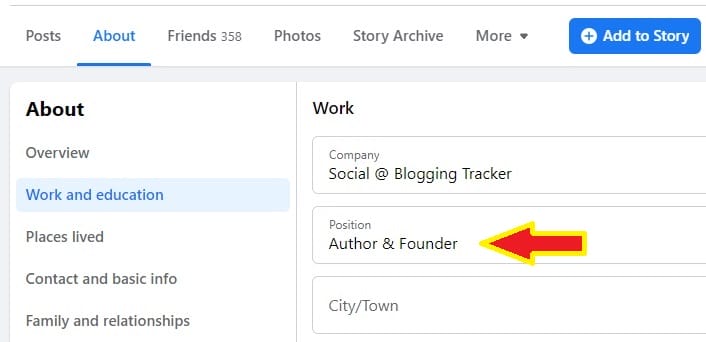
Position: Simply type out your position name that fits you expertise. There won’t be an active link for ‘position’ so don’t worry if you cannot find the position of your choice in the suggestion box.
City/Town: Places where you work. If your business is about networking/reaching out to people within your area, you can fill it in as well. If you don’t feel like giving out this information, leave it blank.
Description: A brief introduction about your work and expertise.
Time Period: Mark your current employment by ticking the box for ‘Time Period > I currently work here’.
Extra Tips: How to Increase Visibility of Your Facebook Page (Updated 2022)
While the Company Page link is quite enough for people to visit your Facebook Page if they want to, adding an extra link in your work description definitely doesn’t hurt. If you’ve crafted your description properly, you may even persuade more people to visit your Facebook Page by adding a call to action in the end.
The link may not be clickable in the description, however, if you allow to Share as a post on News Feed, then the link will be clickable. (this option will be given once you’ve added your Workplace successfully)
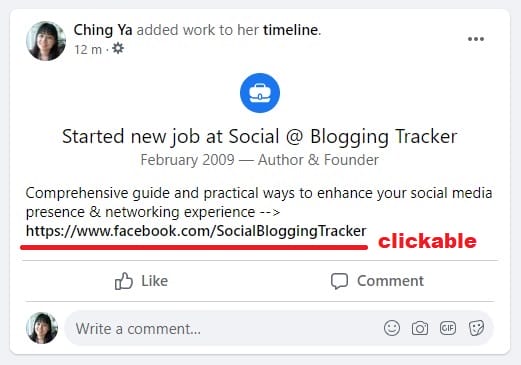
Also, when people visit and click your Profile’s ‘Life Events’, it will appear just like the post on the Timeline.
Another important tip is to always keep your Facebook Page’s About section up to date. People can always mouse over your Facebook Page to get a preview before clicking and you don’t want to miss the opportunity with an outdated or blank page.
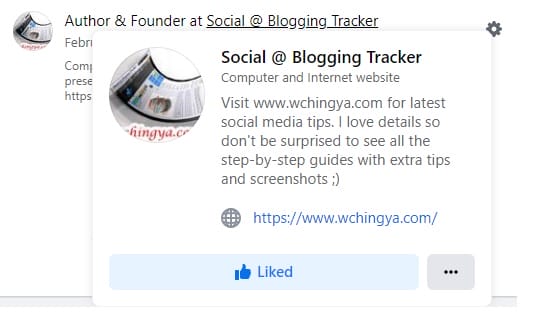
If you have more than one Facebook Page to share, you can definitely add more workplaces by repeating the earlier steps. But don’t overcrowd your personal space, remember to properly separate your work from leisure without offending your friends. Plus, people are less likely to click if there are too many links displayed. Focus on one Facebook Page at a time.
Why is My Facebook Page NOT Showing on My Personal Profile? (Updated 2022)
Make sure you’ve checked the visibility of your Workplace. Go to About > Work and education > Set the visibility to your preferred audience.
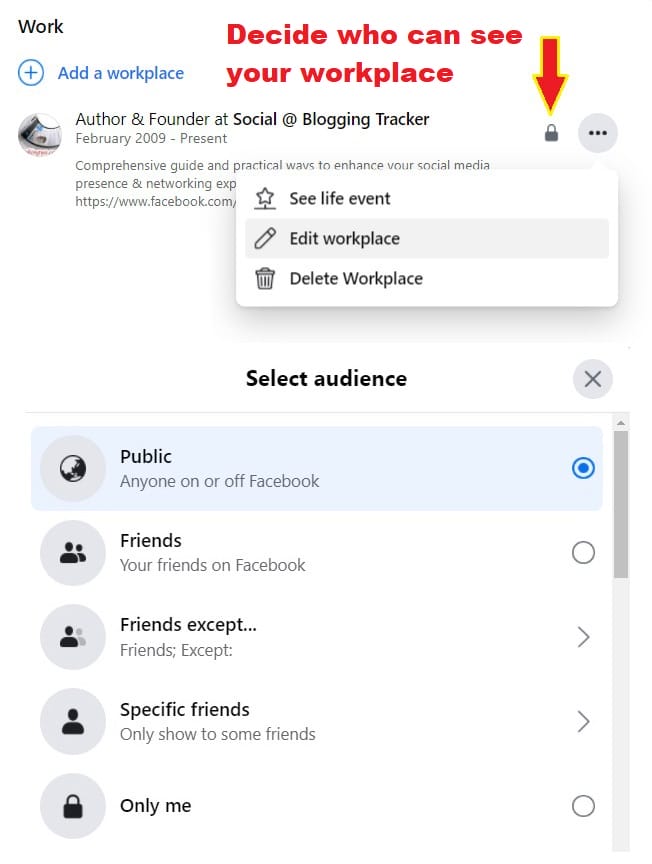
If your Facebook Page is still not appearing/visible, there are a few things you need to make sure of:
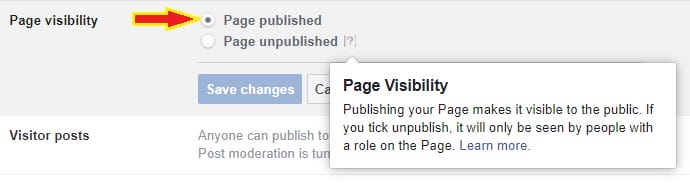
- Your Page needs to be ‘Published’. To check, go to your Page Settings > General > Page visibility (set to Page published)

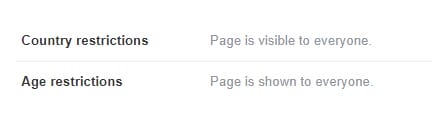
- If your Page has Country or Age restrictions, it may only be visible to a certain group of people. Therefore, make sure it’s visible to everyone.

- If your Page is brand new, it may take a few days for it to appear in Facebook’s system. Also, make sure you have completed most of your Page’s information, such as basic info, adding a profile picture, cover photo etc.
NEW PAGE EXPERIENCE: Check Your Settings
If you’ve recently switched to New Page Experience, the steps are slightly different than your classic page interface.
Now, you’d want to check if you’ve accidentally restricted your New Page to a certain age group or countries:
- Go to your Page’s upper right corner and click the Page’s profile picture. Go to Settings & privacy > Settings
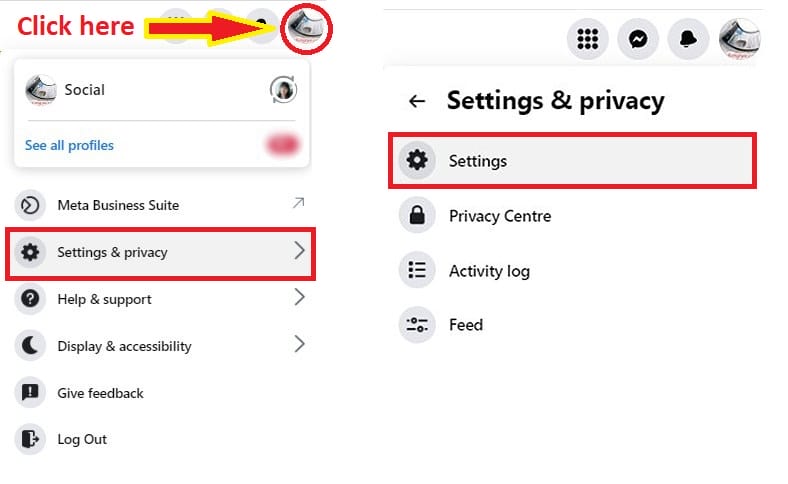
- In the New Page Privacy section, look for Public posts > Restrictions
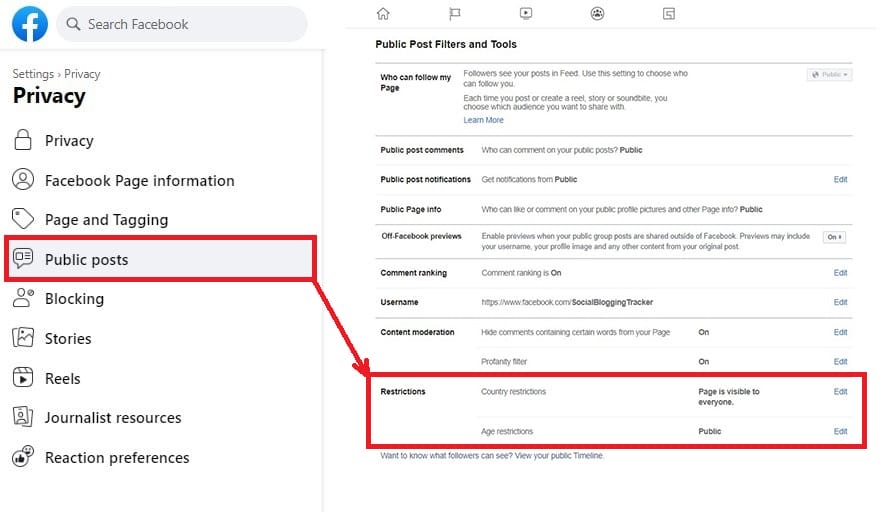

Now that you’ve made sure your New Page is visible to everyone, it won’t be a problem to add it to your Personal Profile.
The Page visibility will no longer be available. Instead, the New Page Experience allows you to activate or deactivate your page.
So, if you had previously deactivated your Page, make sure to reactivate it before adding it to your Personal Profile.
To Reactivate Your Deactivated Page:
- Click your New Page’s profile picture at the upper right corner. Go to Settings & privacy > Settings
- In the New Page Privacy section, look for Facebook Page information.
- Click Reactivation, then click “Reactivate” next to the Page you want to reactivate.
How to Invite Friends to Like Your New Page Experience (Updated 2022)
Now that your Facebook Page is all set and attached to your Personal Profile’s employer link, you can invite your friends to like your New Page to increase its visibility and engagement.
If you have recently switched to a New Page Experience, chances are you might face a glitch while inviting friends to your Page – the “Invite friends” option on the New Page Experience failed to work:
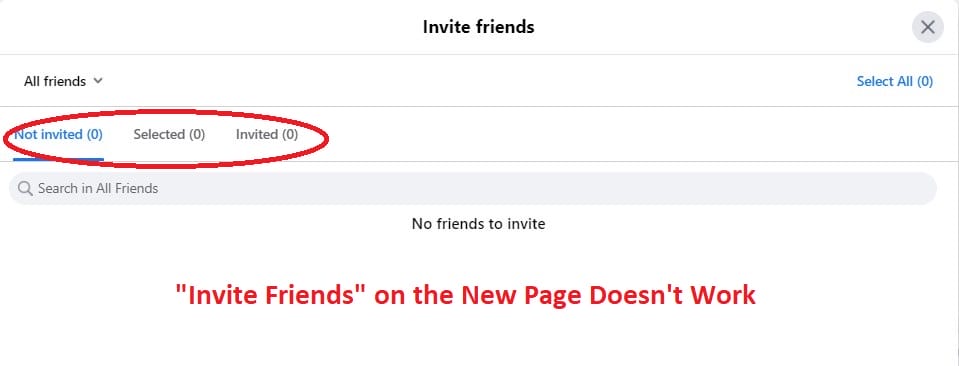
It’s understandable since the idea of the New Page Experience is to separate itself from your Personal Profile. However, it did take away one of the most useful features to increase followers.
But fret not, the option is still there, you just need to know where to look for it. Here’s how you can invite friends to follow your New Page Experience:
- Go to your Facebook Page/ New Page, click on Manage. Or, just look for Professional Dashboard at the sidebar.
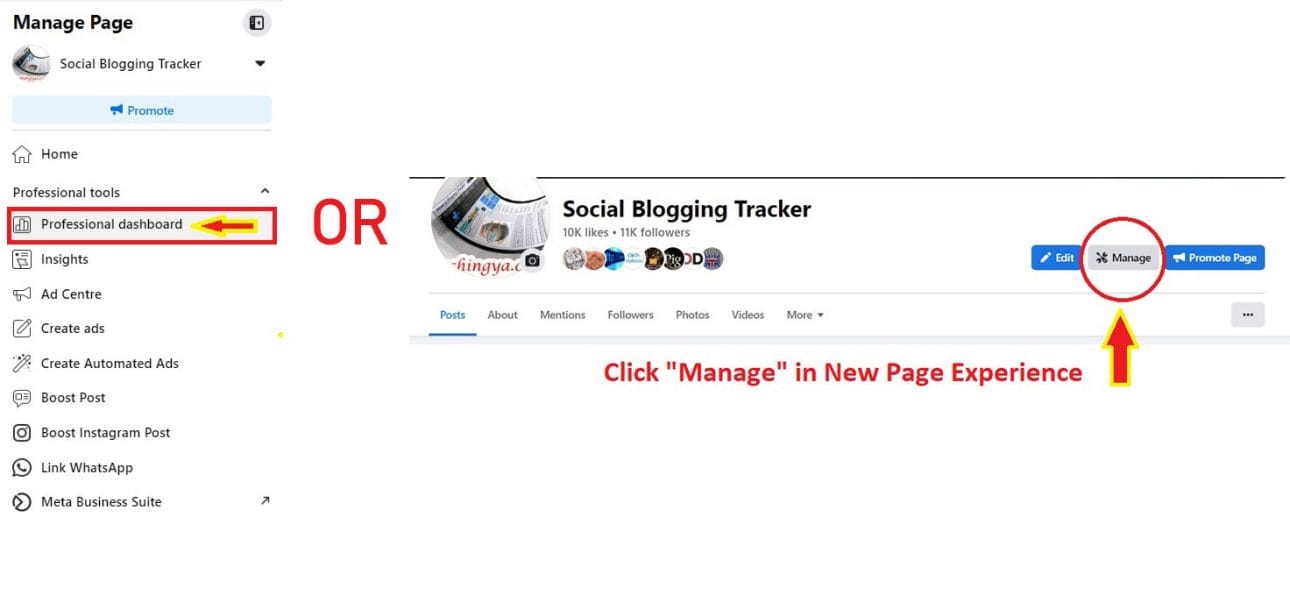
- In the Professional dashboard, look for Grow your audience > Invite friends to follow
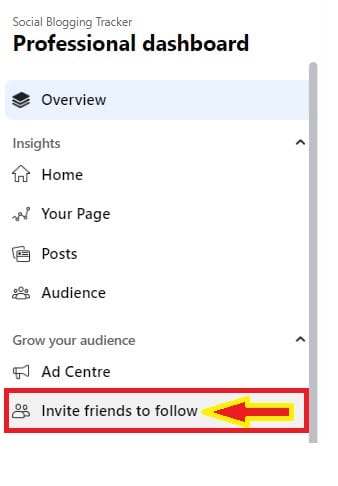
- You will be asked to switch to your personal profile. Click Continue.
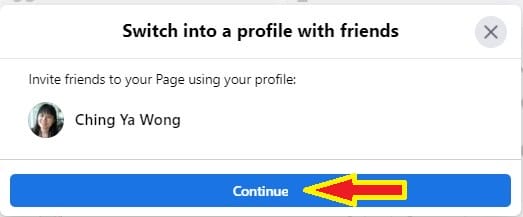
- Now that you’re acting as your own Profile on Facebook, you can now invite friends who have not yet liked your New Page by ticking the box next to their name. When you’re done, click Send Invitations.
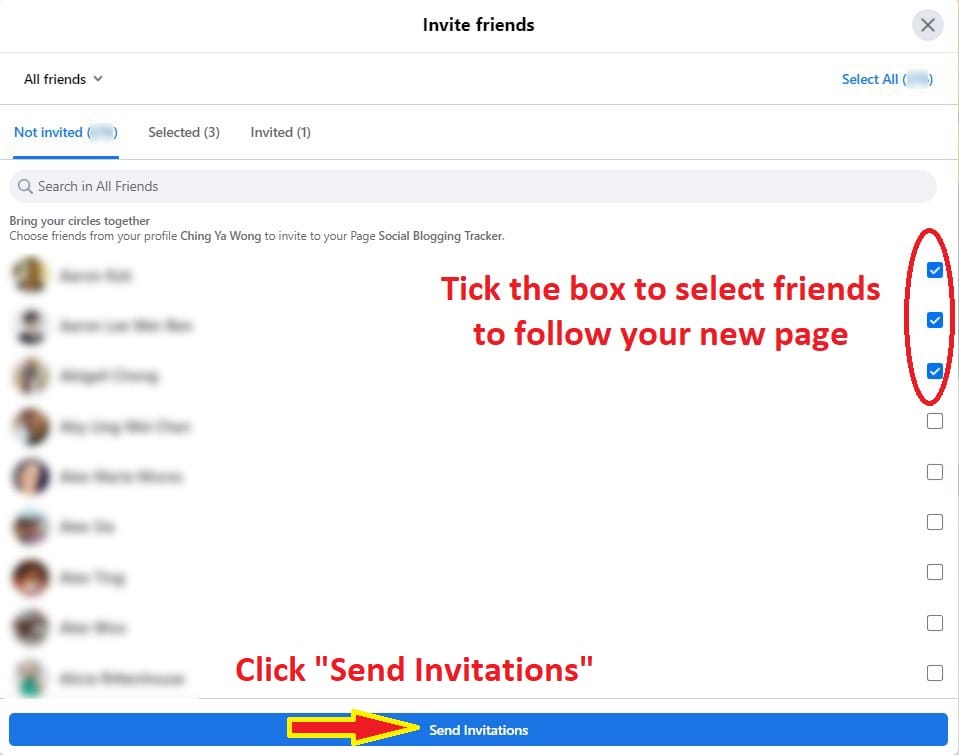
It is said that you can only invite up to 200 friends to like your New Page. So, go easy with the invite. By the way, be sure to check out other important things you should know about New Page Experience, especially if you’re a Page Admin.
Problem: Cannot Find The Right Facebook Page (Updated 2010)
If your company’s Facebook Page does not appear in the drop down suggestion, make sure to ‘Like’ the Facebook Page first before adding it.
Adding a Facebook Page as your employer link should be easy but there’s one major problem: no option to place our very own official page link there, instead a community page is created for each field inserted. Huh?
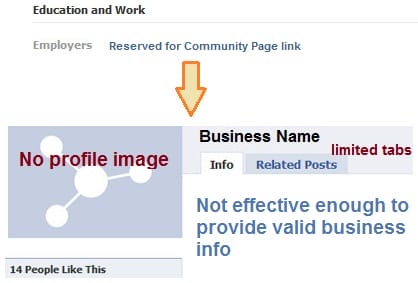
Imagine the frustration for unable to showcase our brand correctly with an authentic page. But now a new found fix will change all that – thanks to a Firefox add-on named Web Developer, and you don’t even need to stick with firefox after this, only during the setup.
Web Developer – the magic plugin to fix employer link
If you do not own a firefox browser, Web Developer will give you enough reasons to install it for the sake of your business page visibility. This add-on is for firefox only but final result will work on all browser types. Web Developer adds a toolbar for web development purposes, but no fear as inserting a page ID will get things done with no coding complications at all.
Without further ado, here are the solutions:
Solution For Older Profile Layout (Before Profile Upgrade):
1. Firstly, install firefox if you haven’t and run the setup.
Special Note: Good news as Google Chrome also comes with the Web Developer extension and it works exactly the same way!
2. Next, install Web Developer to your firefox.
3. Restart the browser as instructed and you will notice a toolbar appears on top of the browser.

4. Now go to your official fan page and locate your Page ID.

If you already claimed your vanity URL or username, then retrieve your official page ID by mouse over ‘Edit Page’:
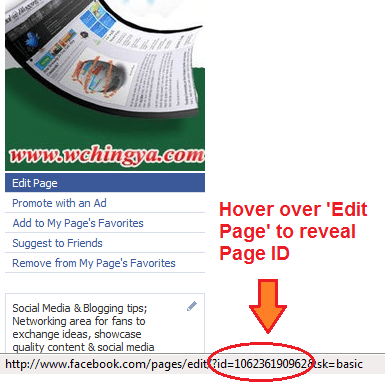
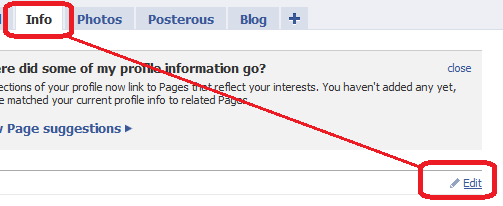
5. Let’s go to your personal profile now : Profile -> Info tab -> Edit
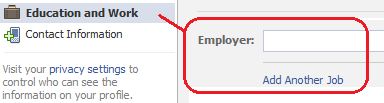
6. Select ‘Education and Work’ -> look for ‘Employer‘ field box (with ‘Add Another Job’ below it).
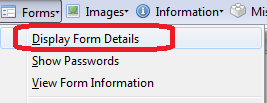
7. Now at your browser, look for the Web Developer toolbar and select Forms -> Display Form Details
8. Do not be taken aback by the scary looking codes displayed to you. Instead, try to identify the location of this code:
<input name=”work[employer][id][0]”>
Once you have found it, insert your page ID next to the grey box as shown below:

9. Turn off codes by deselecting ‘Display Form Details’ on your browser and fill in the rest of the details -> Save Changes. You can add as many jobs as you prefer by repeating step #7-9.
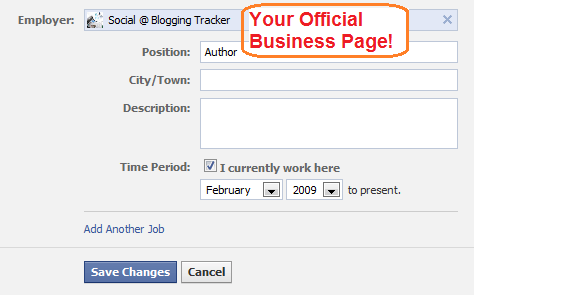
10. Go back to your Info tab and admire the result!
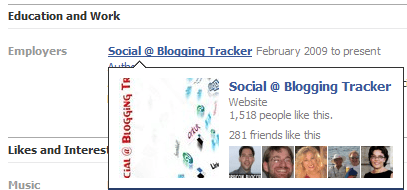
Solution For New Profile Layout (Updated 2010):
Updated (23/02/2011): For New Profile, now you can have a much simpler way to add your Facebook Page. Just delete your job (that created a community page) and when you try to re-add it, you will be prompted to link to your managed facebook page. No extra steps required.
Updated (09/12/2010):
Now recently facebook had recommended their users to upgrade their personal profile to new layout. This method still works but with a slight twist at the Page ID insertion part. I would recommend you to change the employer link in the old profile first before upgrade to save the trouble. Or if you had done so, then follow exactly from Step 1 – 6 above, then continue the rest here:
7. Type in your Page Name in the Employer box, click ‘Add’ (your page name)’.

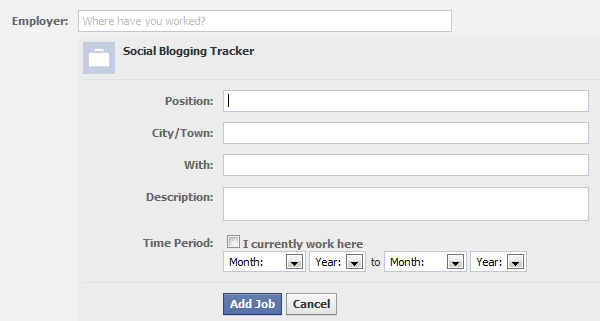
Sometimes facebook will load the correct thumbnail of your official page. When that happens, you can stop here and shout for joy! If instead of your page but a briefcase thumbnail appears (community page is created), then go on with the rest of the setups by going to your browser and select:
Forms -> Display Form Details
8. Again, try to locate the location of this code:
<input name=”work[employer][id][0]”>
Once you have found it, change the community page ID to your official page’s in the grey box:
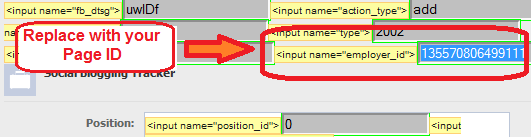
Click ‘Add Job‘ (or ‘Save Changes‘ if you are editing) to confirm your change.
Optional: Sometimes if the page is not updated correctly, try to add details to your Job, for example setting the Time Period -> click ‘Add Job‘ (or ‘Save Changes‘). You can always remove them later after you had successfully added your official facebook page:
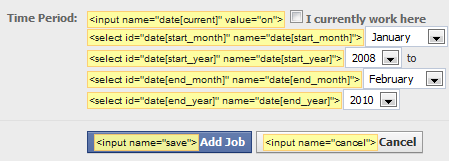
Your official page should be added correctly now.
Solution For New Profile Timeline (Updated 2011):
Updated (23/12/2011)
For the most recent upgrade to Profile Timeline, slightly different for where the employer link is located and the code as well. Refer to the instructions below after you had installed the Web Developer Add-on. I’m using Firefox 3.6.22 for this example:
1. Go to your Profile Timeline -> Update Info (or click ‘About’) to access your work and education details.

2. Add your work by typing the name of your business page. Sometimes instead of the Page’s full name, try its partial name so it will appear in the drop down:

3. When that’s not working, use the Web Developer -> Forms -> Display Form Details. Then locate the code <input name=”employer_id”> to insert your Page ID in the grey box:

Extra:
There are a few things I came across during the setup as well – the ‘position’ you filled in Employer section will be directed to a community page (of course), just as how the employer link reacts before the change.
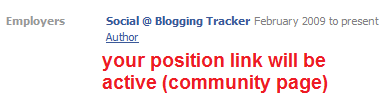
So make sure you select the best position title that describes your post. If needed, use the same method to control where the link is been directed to.
Now is Your Turn…
Does this method work for your employer link? Or do you have a better idea for a fix?
MORE FACEBOOK TIPS:
- How to Change Page Name, Username and Facebook Access (and MORE) in New Page Experience
- How To Comment As Your Facebook Business Page On Other Facebook Pages
- How To Separate Your Facebook Page From Personal Profile
- 15 Practical Ways To Protect Your Facebook Profile From Facebook Page
- How To Find Your Pending Friend Requests (And Sent Requests) On Facebook
- How To Connect A Facebook Group To Your Facebook Page
MORE TWITTER TIPS:
MORE INSTAGRAM TIPS:
- 15+ Lesser-Known Instagram Tips, Features And How-To’s You May Have Missed
- How To Organize And Control Instagram Feed For Accounts You Follow
- How To Schedule Post & Video To Instagram From PC
- How To Post To Instagram From PC
- How To Post Link On Instagram Story [With Link Sticker]
- How To Switch To Instagram Business Account From Your Personal Account
Hiya Ching Ya,
As always great post.
Since the introduction of community pages I had been hesitant about adding my employer information, I had actually deleted it.
Thanks to your detailed and informative post , am off to put this to good use:)
Deidre, good to know. 🙂 I’m too excited when I learned about this tip, very handy & can do us all a big favor. Appreciate your comment and visit.
As always, very informative and helpful post Ching Ya!
You’re welcome, Kevin. And thanks so much for the Retweets. 🙂 Appreciate your visit.
Ching…I am completely new to this thing. Still learned something. Thanks for the info. Keep writing.
Thank you Aswani for dropping by. 🙂 It’s great to know that people are benefiting from the tip, even if saving it for later-use. No problem and I appreciate your feedback as always.
Always learning more and more about Facebook…you’re a great teacher 🙂 Thanks!
Cheers,
Gera
Appreciate the kind words, Gera. Thank you for taking the time to drop a few words. Hope you’re fully recovered from sickness. All the best! 🙂
Ching Ya:
You are an INCREDIBLE resource – and that tip is simply amazing!
I’m suddenly wondering what other uses there must be for that ‘Web Developer’ extension… one would assume that any social media profile could be customized in a similar manner.
Any creative ideas? Ching Ya? Anyone?
My guess is as good as yours, Jon, but certainly would like to try more with this new found plugin. 🙂 I’ll keep you updated. Great seeing you here, thanks a bunch for visiting. Hugs.
I have created my company page and have linked it as my employer. Now how does a employee add my business page as their employer? My page still does not drop down on the employer list. What should they do?
Thanks
Clint
Thank you for dropping by, Clint.
You may ask your employee to try again by removing all the added page(s) in employer section and re-add it once more. Some people told me they had to try several times to get the page ID attached via this method, or, add a page duration, or try to ask them to use another browser instead, for example if they are using firefox, use Chrome for a change (as it also has the plugin):
https://chrome.google.com/extensions/detail/bfbameneiokkgbdmiekhjnmfkcnldhhm?hl=en-US
Thank you! Thank you ! Thank you!
Welcome x3, Anne. 🙂
Hi Ching. Long time no see. Sorry for being too silent lately. You probably know that I had some personal matters that required my attention and little by little I am getting back. Anyway, as I have mentioned before, I am not a FB expert. Actually most of the things I know, I learned from you 🙂 This one may fit in a gap I was looking for. Thanks and all the best.
Thanks! This really helped me!!! 🙂
Bingo!! I hate the default page which Facebook gives, it looks sick.
Thanks for the tuto Ching, as always “thumbs up” and kudos.. cheers. 🙂
Very informative article. I would really want to add my current employer’s link and this process is indeed what I need. thanks much for sharing
Thank you so much ! Facebook kept selecting the wrong employer page for me… with this tip, I finally managed to get it right !
Thanks for this Awesome tutorial. This is called a real hack. 🙂 Can I write an article on it at my blog, will surely give proper credits to this article?
I am having trouble getting this to work with the new FB profile. I tried adding the employer id number to the grey , but nothing happened. Any ideas on how to modify this fix to get it to work with the new profile page? THANKS!
Not having luck with this. I keep pasting the page ID… but it’s not connecting to my fan page. Is the ID only the number? or is it the whole entry: id=120406610619&sk=basic? When I hover over the link on the personal profile for work, shouldn’t I see my logo from my fan page? I guess I’m not getting it. Can you help?
Thanks… I appreciate your time… and thanks for the tip.
Deb, yes just the number. If your page ID is ‘120406610619’, then just input these numbers at the field box where the code ” is displayed. If need to, try to add a duration of your employer before Save Changes. See if that helps.
I am having the very same problem as the person above. I even printed the instructions so I could follow to a T.
I tried deleting all of my employer information and starting over – no luck.
Any more tips? Just like Julie – the ID number wouldn’t stick.
Thanks.
Hi Janet, did you try again after this? Were you able to insert the code inside the grey box successfully? Unsure why it won’t stick, I tried it and the code was able to stay in the grey box for my firefox browser. Can you try a different browser? Say firefox or Chrome (whichever you have yet tested on) and let me know how it goes?
I was having problems with the code not sticking while using firefox. But I tried it on Chrome and it worked right away!
Sorry, forgot to mention that it only works when you add a new employer or school, not when you edit. So I’ve just been re-adding them and deleting the old ones.
And thanks so much for this awesome tip! I love having everything link to its proper place 🙂
Thank you very much! Worked like a charm, but only after several tries (of doing the same thing). My advice to some, if it doesn’t work the first time, keep trying! 🙂
Pretty crazy, they just took my info away, worked to find out how to change, but could not get last above suggestions, so I just took everything off the profile but my “employer” to point to my fan page JacktheDog; listed the link at the top. Seems to be one answer, but will miss the about me box dearly.
Info page not a real good option, doesn’t show until searching diligently.
Yes, there is a lot to digest with the new profile. Not always happy with all the facebook changes but if we are to stay there, gotta adapt, sigh.. I even had some problem finding my video tab until I know it is actually in the photo tab: https://wchingya.com/2010/12/facebook-new-profile.html I just hope they have a clearer guide on how to work around the new profile.
Thanks so much for visiting.
Thank you so much for this tip! Now people can find my business page *easily* from my personal page – this was the missing link.
Glad to know it worked for you, David. 🙂 And it’s great to have you here. Appreciate your comment.
Excellent info, shared with my fans. I still have the old profile layout but wanted to control what people with the new one would see up top. Wish I knew I could fix this earlier, very cool! Thanks for the info and excellent tutorial!
You’re most welcome, Karen, so happy to see you here. 🙂 Yes, some people have better luck with new profiles where their pages are listed in the selections. But my guess is that sooner or later, everyone will be able to do that with their own pages. Let’s just hope facebook team is on it to improvise their employer section.
Ching Ya! First just let me thank you for sghring your tips! I unfortunately was unable to make my employer link to thofficial page using this process. Whats strange is that on my profile I didn’t have ay trouble at al, and even withthe new facelift that facebook made. When you go to my profile you will see that when you hover on the link it pulls up our actual page, and logo. Unfortunately, every one of our employees cannot seem to do the same. So I logged into their accounts and tried exactly what you said to do, and it still doesnot work? Any suggestions?
The only thing that I noticed was that where you said to put the page id #, read differently….
instead of this…
It read this…
Hi Chris, I believe the codes you posted was omitted by WordPress commenting system, can you try the contact form here instead to paste the codes:
https://wchingya.com/about-social-blogging-tracker (scroll all the way down to locate the form).
Or, can you send me the screenshot instead? You can try to post it on my page Wall so can have a look at it: http://facebook.com/SocialBloggingTracker (click at Photo icon -> ‘Upload a photo’ from wall
Hi,
This did not work for me. I tried several times, following the directions perfectly. I’ve got the new FB profile and Firefox 2.0.0.20. Does that make a difference?
Nancy, it won’t matter with the new profile, in fact the workaround for new profile is prepared at the lower part of this post. Kindly refer to that.
As for the firefox browser, were you able to get the plugin installed to firefox successfully? Is the toolbar appearing inside the browser? If not you may consider to upgrade your browser to 3.6 at least.
Excellent info and it has all worked EXCEPT —thank you
The only thing now is that althoguh the right thumbnaila nd profile pic and link are on my profile and work when clicked – the actual link isnt showing at teh top of my page on the new profile and it still says enter employer details?
HELP!
carol
Hi Carol, could it be due to a bug on the new profile? If you have successfully saved your employer data and it still unable to show on top of your profile, try to submit a bug report about this:
http://www.facebook.com/help/contact.php?show_form=new_profile_bug
Just posted link to fab tutorial. BUT I CANNOT get “Add a Job” to appear! I ONLY can “Add a project” to an existing job! I have tried for days.
Plus I do THREE jobs: punk photographer, holistic healer and web marketing coach. Doesn’t FB realize MANY of us juggle many “jobs” at once?
I simply DO NOT SEE “Add a job.” I’m stuck!! ANYONE else have this problem? I searched and searched the web.
Very upset cos I just started w/a networking biz, many of my pals wanna know, many ppl searching for this, and I merely have “self-employed.” That serves no one. Thanks. Namaste!
I think I figured how to post more than one job/activity: NOW jobs ONLY can be added IF either a Community Page or Biz page. I need to create a Community page which lists all my “work,” then link to it. Better, create a biz page, keep it simple/sweet, list my various activities, and their links, and LINK THAT Page to my “works at.”
That should work til FB changes it again! Oh, nice way to waste an evening … IF ONLY FB posted this little tidbit.
Bravo to you Jenny for making it worked at last. 🙂 And it’s great to know you from this post as well. Hope to see you here again sometimes. Happy holidays!
Thanks for the reply. FB is trying to force us into categories so we can be marketed. They don’t care if we do several things, or want to share various educational tracks. Does not serve them, cos then we are no longer a TARGET.
We can ONLY link to a community or biz page, so make a BIZ page. Cos community pages are NOT OURS. We have no control and they can take them away. So make a biz page, put whatever we need on it.
THEN with YOUR GREAT illustrated tips, we can link our customized Biz Page to our Personal Profile.
Yikes, whatta lot of freakin’ extra work. Been working w/computers since 1987. Figured out tons of stuff WITH other’s input.
YOUR info was the missing link. I SEARCHED and searched Google and asked ppl on FB. MARI SMITH gave me yr link. I had found it. I was stubborn til you verified I could never again just Add a Job and put whatever in the field.
Now, how to do for education? I am proud of my MANY degrees, certs and various schools. Should I highlight Cal Arts or UCLA? TWO art degrees or my legal certs? See how they limit us?
THE only time I can ever be put into a box will be a coffin. Wait, I wanna be cremated. Ok, ashes in a box. Til then, WE should have CHOICES what we want to broadcast to the world.
THAT is what Social Media is about. Facebook doesn’t agree. They are turning into the world’s biggest online store. And that works for US, IF we know how to use it correctly.
**IF you figure out how to indicate MORE than one school, pls let us know!!**
I had to change dates so Cal Arts appears.
BUT they say ATTENDED. Heck NO, I earned a Master of Fine Arts in Design degree. VERY few artists earn MFAs. Why don’t they let me POST and BRAG about that in status bar?
How’s that for punk attitude? Can take the camera away from me, but not being a punk. I call it as I see it. 😉
TMI, LOL. Happy New Year, everyone! To an ABUNDANT 2011!!
I have tried every thing and nothing is working, what to do what to do.
Chef Juan
Juan, seems like this comment thread is getting narrower. 🙂 Can you please start a new comment and explain what did you do so far and which step is not working. Thanks.
Actually,
after some more testing:
it seems that you can’t (at least I haven’t managed to do this) edit an existing job experience created with the new profile, but you can hijack the id field during the creation.
So enter any company name first (I always chose something existing) and change their ID to the ID of your choice. This still works.
Also works for projects!
THANK YOU SO MUCH! I had changed to the updated profile on facebook, and when I tried your updated instructions for the updated facebook (as opposed to the basic instructions) it worked perfectly! Thank you Thank you Thank you Thank you!
Ok, I have a huge problem and I don’t know how to fix it.
I followed all the steps you described, I even managed to learn my facebook ID :), but, after I make the change and I press “save changes”, the ID doesn’t change.
There is no error and it looks like the changes have been made but, when I check again the ID, it is the old one… X-(
Ines, did you try to add the work duration for the page? Also, if after numerous time it’s still not working, try to work on another browser type, other than the one you’re using. If you’re using firefox, switch to Chrome instead and see how it goes.
Or, maybe you can try to remove the existing job (fan page) altogether, start over fresh by adding new job instead of editing it repeatedly.
Thank you so much. This was so useful! I had a similar problem as some people above as it was not recording the changed id and I had to remove my job all together and then add new job. I am working on firefox.
Thank you for your answers. I will try everything you said today and come back with a feedback.
Great suggestion given, Shalini. Thanks so much for willing to share your feedback here so others can try it out if stuck. I really appreciate it.
Yey, it worked! I did what you suggested: I removed everything and started again. Thank you very much! 🙂
Hello Ching Ya ! With the new Profile on facebook I have been unable to add my Fanpage Like badge to my personal profile page. Is this possible today? Thank you
Hi Kristin,
I think it’s not possible to add a fan page like badge on a new profile, but you may attach your business page to your profile’s Employer section for extra publicity so your contacts/visitors will know about the fan page when landed on your new profile. Have you done so? 🙂
I was able to add my page to the employer section and its great ! Thank you so much 😉
I was working through the steps of your tutorial when I realized that the reason my Fan Page wasn’t coming up when I typed it in the Employer box was that I had special characters in the Title. As soon as I removed those characters and saved the new Fan Page name, I was able to quickly type in my new Fan Page name and it popped up with the photo immediately.
Thanks for your article. This is one of those tweaks I’ve been meaning to do for some time.
Thank you so much for the tip, Denise. Indeed, sometimes trial/error works. 🙂 So glad you’re able to get the right employer link on your profile. Merry Christmas!
Thanks for this tutorial, its worked perfectly for me.
I’m sharing this post on all my networks 🙂
Yay, I’ll give you your first +1, hooray!
Thanks Ching Ya,
you are definitely a great inspiration to us all !!
Merry X’Mas to you and family 🙂
Thank you Delson, truly appreciate your kind words. Merry Christmas and Happy New Year to your family as well. 🙂
I think there is an easier way to get your Page-ID. If you export your “Insights,” the first column is what Facebook calls a “Post ID”. It consists of two 15-digit numbers separated by an underscore.
The first 15 digits of the Post ID is your Page-ID, while the last 15 digits are the actual posting number.
If I enter https://www.facebook.com//posts/ it will take me to the post page.
If I enter just https://www.facebook.com/ it takes me to my fan page.
Okay, Facebook screwed up my comment … let’s try this …
Page-ID = first 15 characters
Post# = last 15 characters
http://www.facebook.com/{Page-ID}/posts/{Post#} takes me to the post page.
http://www.facebook.com/{Page-ID} it takes me to my fan page.