

[UPDATED 2024] How to Find Your Pending Friend Requests (and Sent Requests) on Facebook
If you’ve been on Facebook long enough, you’d realize that Facebook had made many changes to this option over the years. Good news is, nowadays it’s a lot more easier to locate your ‘Sent Friend Requests’.

In order to find it, you’ll need to access your Friend Finder first. There are two ways to do so:
- through your newsfeed’s left column (look for ‘Friends’)
- look within your Menu > Friends
Another quick access is via this link while you’re logged in: https://www.facebook.com/friends
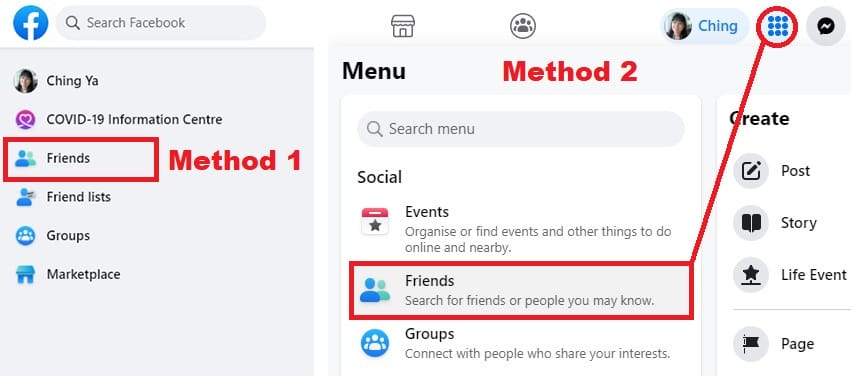
Once you’re in Friend Finder, you’ll see all the Friend Requests you’ve received and People You May Know.
How to See Sent Friend Requests on Facebook
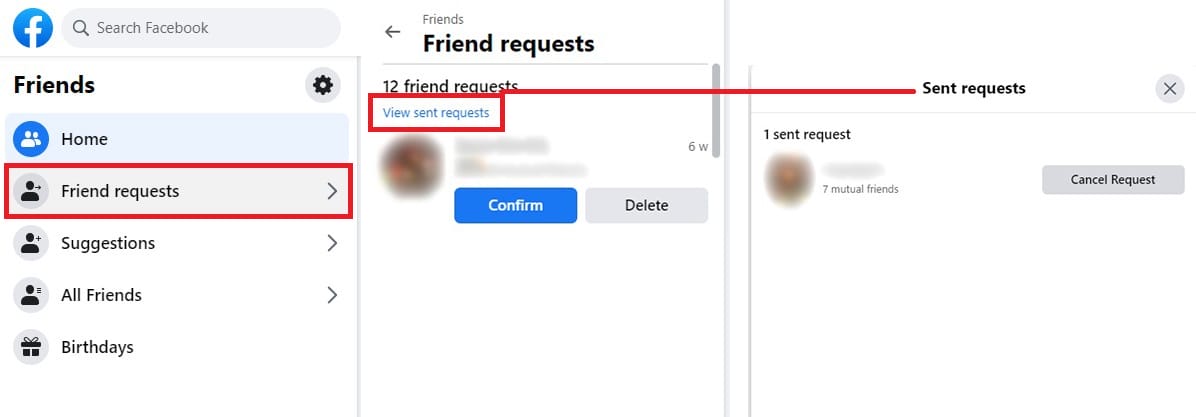
To see sent Friend Requests on Facebook, just go to Friend Requests > View sent requests and voila!
Here you can choose to Cancel Request if you changed your mind about a potential friend.
How to Get Notified of Accepted Friend Requests
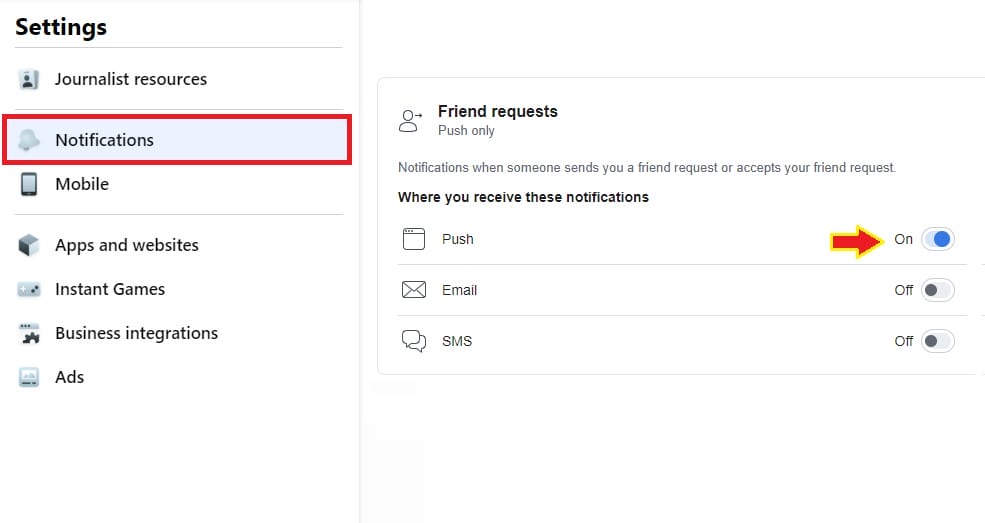
If you want to be notified about your friend requests been accepted, go to your Notifications setting and look for ‘Friend Requests‘. Here you can set to be notified via Push, Email or SMS.
Simple, right? Well, it’s not so years ago. I had to write about methods to track sent requests just because the option wasn’t available then.
So, just in case the feature is going away someday (hope that’ll never happen), feel free to check back for the workaround – using Facebook Lists.
Step 1: Build Your ‘Pending Friend Requests’ List
1. After logged in your personal profile, go to this link: https://www.facebook.com/bookmarks/lists
2. Click ‘Create a List’ and name it ‘Pending Friend Requests’.

3. You won’t need to add anybody to the list yet but whenever you sent a friend request, be sure to add him/her to your ‘Pending Friend Requests’ list.

Step 2: Manage Your ‘Pending Friend Requests’ List
Unlike any Facebook applications, you need to update this list manually whenever a friend request is accepted. You can easily aware who just accepted your friend requests via Facebook Notifications or email alerts. After that, remove your new friend from the ‘Pending Friend Requests’ list.
Now, what if you missed the notifications and forgot all about the list after sometimes? Fear not, there are ways you can modify the list after several accepted friend requests.
Bear in mind, your custom list will be consisting of updates from both your new (accepted) friends and non-friends (their public stories). Therefore you need to make sure the correct profile been removed from your ‘pending friend requests’ list, but how do you determine that?
Method #1 – Update ‘Pending Friend Requests’ List in News Feed
a. Open your ‘Pending Friend Requests’ list and scroll through the feed. Hover over the profile to reveal his connection with you: If he/she had accepted your friend request, the ‘Friend’ button will appear. Remove everyone who established the ‘Friend’ connection with you, leaving the actual pending requests remained.

Method #2 – Check if Someone Had Accepted Your Friend Request
Instead of visiting the person’s facebook profile, you can check this within your custom list:
a. In your ‘Pending Friend Requests’ list -> ‘See All’ (upper right corner) to load the popup menu.

b. From ‘On This List’ you can have an overview of the people you sent friend requests to on Facebook. The unanswered/unaccepted friend requests will not appear in your ‘Friends’ list. For example, if Ron had yet to accept my friend request, his name won’t appear in my ‘Friends’ list. That’s how you know if a particular friend request is still pending or accepted.

These methods can only assist you this far in monitoring current and future sent requests but not previous ones. If anybody knows how to track back old (unlisted) friend requests, be sure to drop me a message!
Now Is Your Turn…
How do you manage pending friend requests before this? Do you think it’s necessary to have a checklist for it on Facebook? Kindly share your thoughts.
MORE FACEBOOK TIPS:
- How To Comment As Your Facebook Business Page On Other Facebook Pages
- How To Add Official Facebook Page To Your Personal Profile
- How To Separate Your Facebook Page From Personal Profile
- 15 Practical Ways To Protect Your Facebook Profile From Facebook Page
- How To Connect A Facebook Group To Your Facebook Page
MORE TWITTER TIPS:
MORE INSTAGRAM TIPS:
- 15+ Lesser-Known Instagram Tips, Features And How-To’s You May Have Missed
- How To Organize And Control Instagram Feed For Accounts You Follow
- How To Schedule Post & Video To Instagram From PC
- How To Post To Instagram From PC
- How To Post Link On Instagram Story [With Link Sticker]
- How To Switch To Instagram Business Account From Your Personal Account
I was just looking at a Facebook friend’s page, and when I clicked on my friend’s friend list, I could see “Friend Request Sent” next to a couple people. If you check out the friend lists of a few close friends you could possibly use that as another quickie way to track some of your outstanding requests.
Thanks so much for pointing that out, Bear. I’m not aware of this info, will check on that.
Really appreciate your visit and comment. 🙂
Thank you for sharing this information. I am not well informed regarding this feature. Thank you and I will check this out.
Hi Ching Ya,
I especially needed this one since I had family members asking me why I hadn’t approved theirs friend requests ~ LOL!
Honestly since Facebook made all of those changes I’ve been pretty lost in there.
Tweeted, +1d, liked and will share now on Facebook 🙂
All the best,
Eren
I know what you mean, Eren. 🙂 I know how challenging it is to trying to keep up with all the requests… been there. Glad could share the info. Thank you so much for sharing this, really appreciate it.
Those are some great tips. I haven’t started using the lists on facebook but I use them all the time on twitter. You’ve developed a great way to track sent friends requests.
Thanks for the useful post. I’ll take action on that… Good to c u in the SME Clubs too 🙂
so i followed all of ur steps. but how do i figure out whos denied me and if they do will they still be on the list??
Sieana, that’s the one-thing lacking from this manual customized facebook lists – you need to update it personally by checking if the person had accepted your friend request or not after some times. The name won’t be removed from your list unless you do so. Unfortunately, there is no way to find out if the person had denied you, same thing if they wish to ignore your request. This is how facebook designs it so we won’t be notified with this info. Therefore, it’s always advisable to give your friend request a time frame and remove the pending ones if they are piling up for longer than a few weeks/months.